

Contract Scanning (Assignments)
The “Scan Contract” button on the assignment form extracts up to 12 fields from formal staffing agency contracts.1
Open the assignment form in create mode
The “Scan Contract” button is only available when creating a new assignment (not editing). The button is hidden if the server doesn’t have an Anthropic API key configured.
2
Upload the contract
- Supported formats: PDF, JPEG, PNG
- Maximum file size: 10MB
- The file is uploaded to S3 via a presigned URL
3
Claude extracts the data
Claude reads the contract and extracts:
4
Review auto-filled fields
Only empty fields are populated. Review the extracted data and adjust as needed — contracts vary widely in format, and some fields may not be present in every contract.
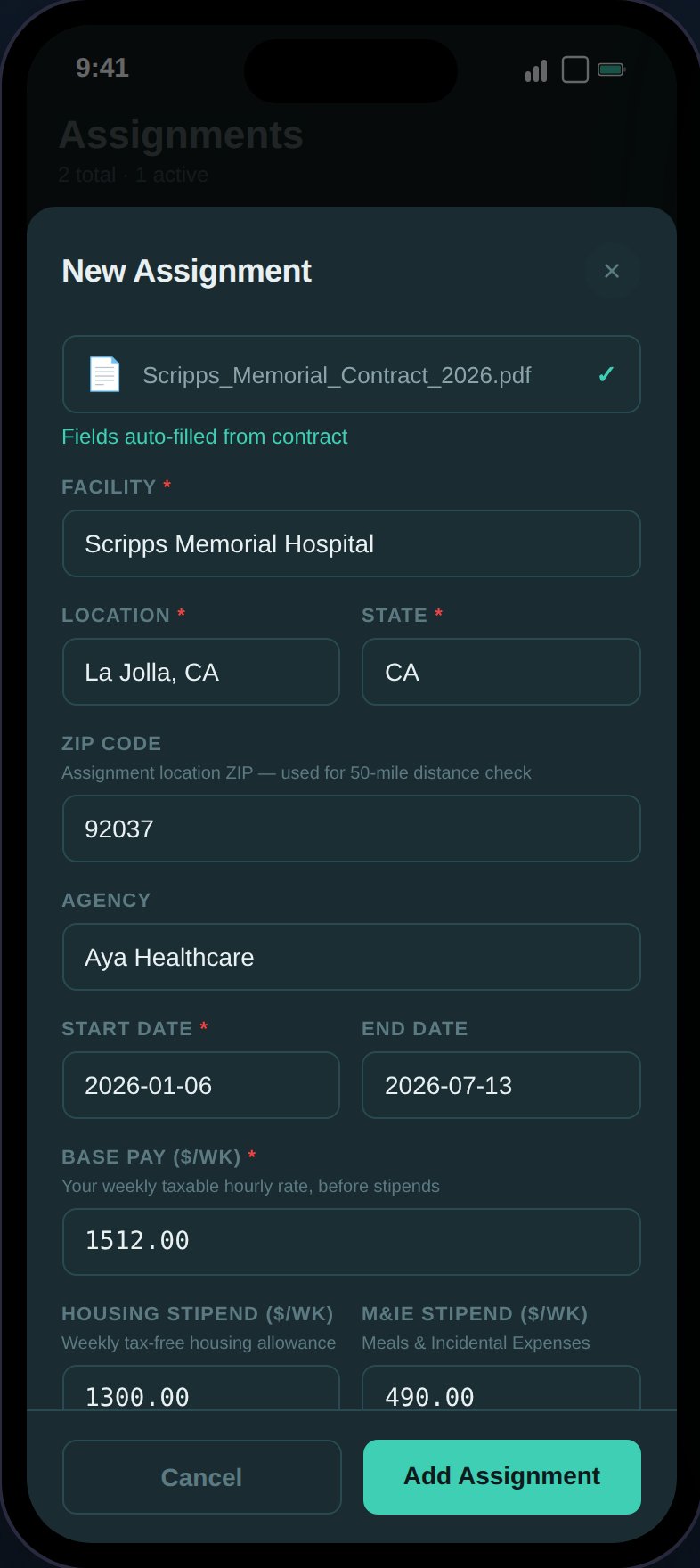
Claude extracts facility, location, dates, pay rates, and stipends from the contract PDF.
Job Ad Scanning (Compare)
The “Scan Job Ad” button on the Compare page’s custom contract form extracts details from job board screenshots (Vivian, AMN, Aya, Medical Solutions, etc.).1
Select a custom contract slot
On the Compare page, select ”+ Custom contract” in either slot. The “Scan Job Ad” button appears at the top of the form when an Anthropic API key is configured.
2
Upload a screenshot
- Supported formats: JPEG, PNG (screenshots only, no PDF)
- Maximum file size: 10MB
- Take a screenshot of the job ad from any staffing site or app
3
Claude extracts the data
Claude reads the job ad and extracts:
4
Review auto-filled fields
Only empty fields are populated. If the job ad shows a blended weekly pay range with no stipend breakdown (which is common), the midpoint is entered as base pay and an info note appears:
Only total weekly pay found — entered as base pay. Adjust the housing and M&IE split if known.You can then manually split the amount between base pay, housing, and M&IE if you know the breakdown.
Job ads from sites like Vivian typically show a blended weekly pay range (e.g., “2,560/wk”) without separating taxable base from tax-free stipends. The scanner handles this by using the midpoint as base pay, which you can adjust once you have the full breakdown from the agency.
Pay Rate Conversion
Both scanners automatically convert pay rates expressed in different formats:Contract Storage
Uploaded contracts (from Assignments) are saved with the assignment:- contract_s3_key stored in the database
- “View Contract” button on the expanded assignment card
- Opens via presigned S3 download URL in a new tab
Feature Availability
Both scanning features require the optionalANTHROPIC_API_KEY environment variable:
- Key configured: Scan buttons visible,
GET /contracts/statusreturns{ available: true } - Key not configured: Scan buttons hidden, features gracefully disabled
- The rest of TaxHomeBase works fully without it
Error Handling
Step-specific errors with retry:- Presign failure — Problem generating the upload URL
- Upload failure — Problem uploading to S3
- Claude extraction failure — Problem parsing the document (e.g., unreadable format, missing data)