> ## Documentation Index
> Fetch the complete documentation index at: https://docs.taxhomebase.com/llms.txt
> Use this file to discover all available pages before exploring further.
# Visual Feature Tour
> See every feature of TaxHomeBase in action.
A complete walkthrough of TaxHomeBase — the tools travel nurses use to protect their tax-free stipends, stay audit-ready, and manage multi-state taxes.
***
## Dashboard
Your home base. The Dashboard shows your stipend protection status at a glance — how much you've protected this year, what needs attention, and when to visit your tax home.
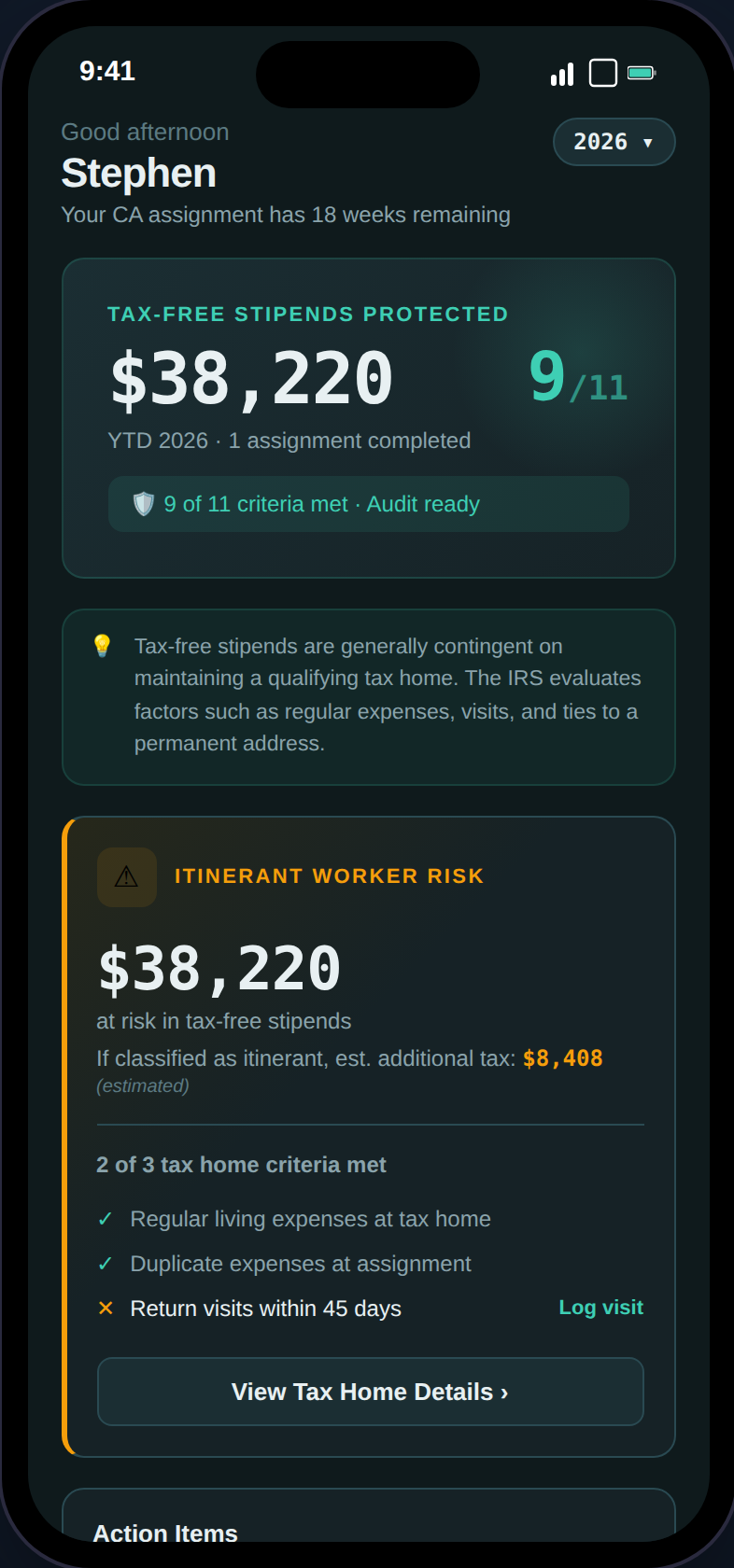 **What you'll see:**
* **Stipend Protection Banner** — YTD tax-free stipends with your audit readiness score (X/100)
* **Action Items** — Compliance alerts sorted by urgency (overdue visits, missing docs, GSA exceedances)
* **Visit Tracker** — Days since your last tax home visit with color-coded status
* **YTD Financial Summary** — Taxable income, tax-free stipends, expenses, and estimated take-home
* **Tax Filing Preview** — Expected W-2/1099 documents and state returns at a glance
***
## Tax Home
The most important page in the app. Your tax home status determines whether your stipends are tax-free or fully taxable.
**What you'll see:**
* **Stipend Protection Banner** — YTD tax-free stipends with your audit readiness score (X/100)
* **Action Items** — Compliance alerts sorted by urgency (overdue visits, missing docs, GSA exceedances)
* **Visit Tracker** — Days since your last tax home visit with color-coded status
* **YTD Financial Summary** — Taxable income, tax-free stipends, expenses, and estimated take-home
* **Tax Filing Preview** — Expected W-2/1099 documents and state returns at a glance
***
## Tax Home
The most important page in the app. Your tax home status determines whether your stipends are tax-free or fully taxable.
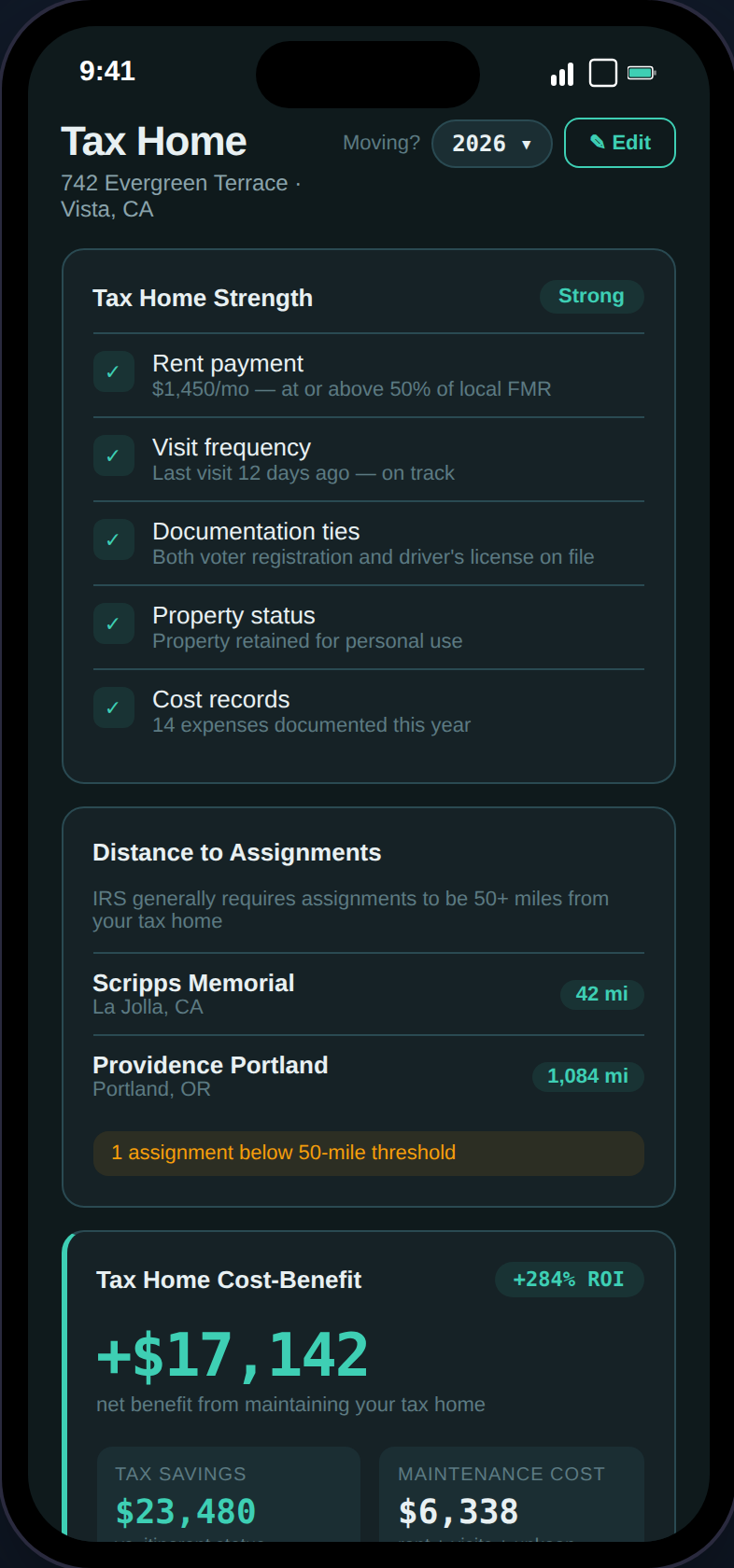 **Key sections:**
* **Strength Score** — Five factors rated Strong / Moderate / At Risk (rent, visits, documentation ties, property status, cost records)
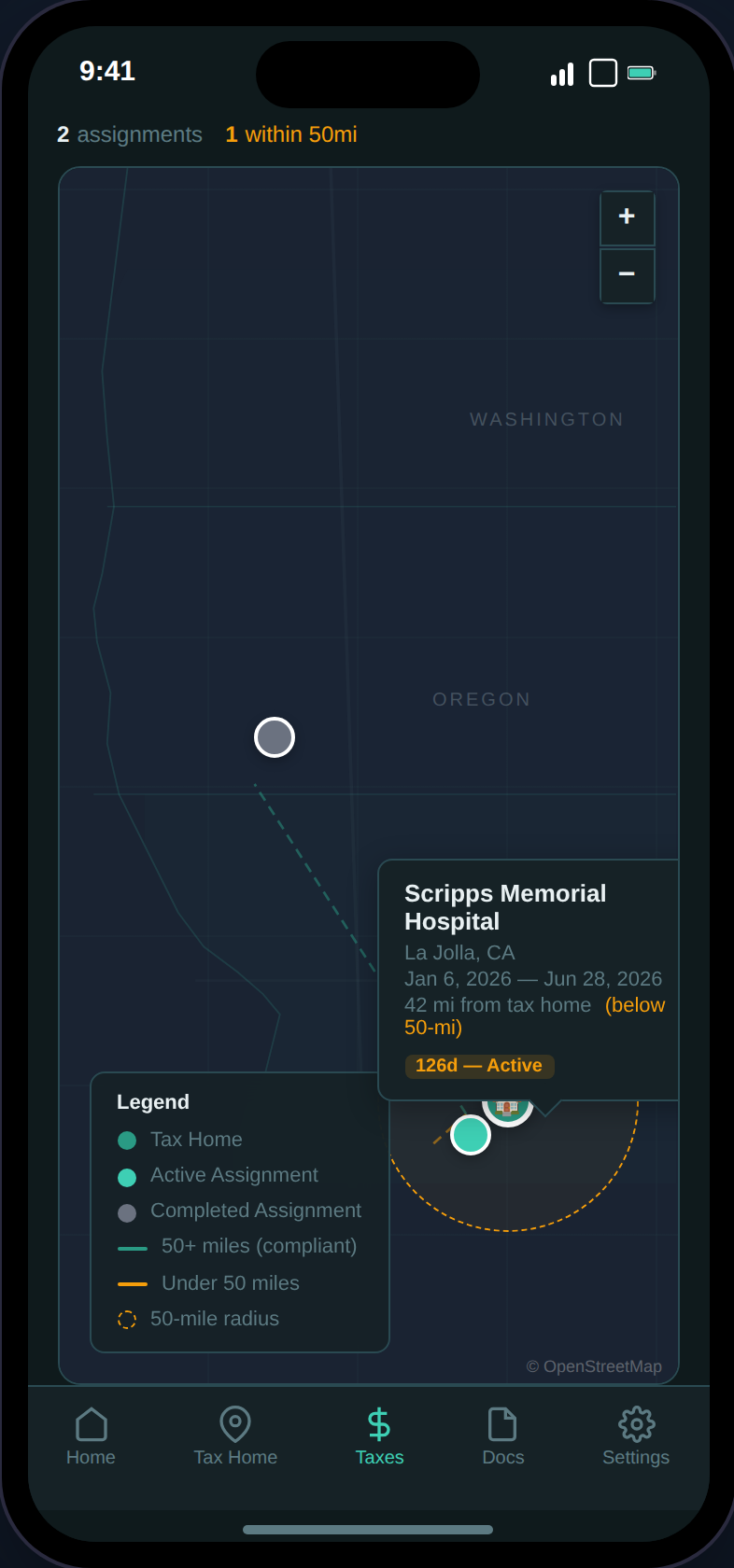
* **Distance Checker** — Verifies each assignment is 50+ miles from your tax home (IRS threshold)
* **Cost-Benefit Analysis** — Is maintaining your tax home worth it? Shows net benefit and ROI percentage
* **Stipend Eligibility** — 6-criteria IRS checklist with pass/fail and financial exposure when at risk
* **Abandonment Alerts** — Warns when risk conditions are detected with direct action buttons
* **Document Uploads** — Lease agreements, utility bills, and other supporting evidence
**Key sections:**
* **Strength Score** — Five factors rated Strong / Moderate / At Risk (rent, visits, documentation ties, property status, cost records)
* **Distance Checker** — Verifies each assignment is 50+ miles from your tax home (IRS threshold)
* **Cost-Benefit Analysis** — Is maintaining your tax home worth it? Shows net benefit and ROI percentage
* **Stipend Eligibility** — 6-criteria IRS checklist with pass/fail and financial exposure when at risk
* **Abandonment Alerts** — Warns when risk conditions are detected with direct action buttons
* **Document Uploads** — Lease agreements, utility bills, and other supporting evidence
 ***
## Assignments
Track every contract with automatic compliance checks. Switch between a card list and a Gantt-style timeline view.
***
## Assignments
Track every contract with automatic compliance checks. Switch between a card list and a Gantt-style timeline view.
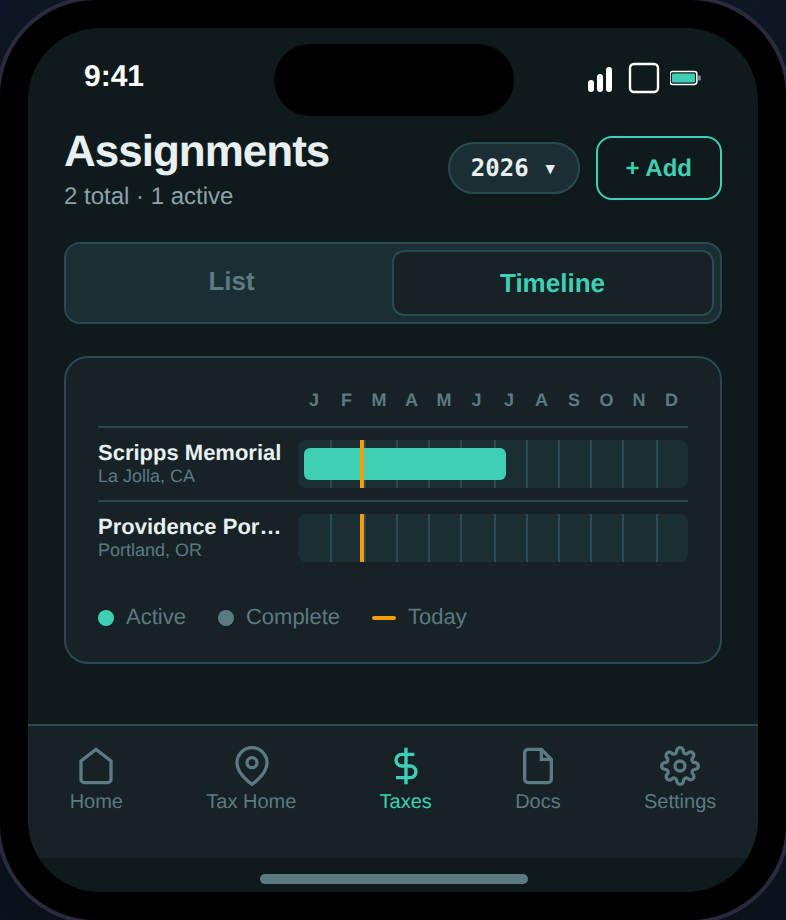 **Each assignment card includes:**
* **Compensation Breakdown** — Base pay, housing stipend, M\&IE, bonuses
* **GSA Per Diem Compliance** — Your stipends vs. IRS/GSA limits (daily rates)
* **Housing Adequacy** — Agency stipend vs. local rent (FMR estimate)
* **Stipend Defense Check** — 7-criteria evaluation of whether your stipends are defensible
* **Net Profitability** — Gross compensation minus taxes and linked expenses
* **Housing vs. Stipend Calculator** — Take the cash or accept agency housing?
* **12-Month Rule Badge** — Warns when an assignment approaches or exceeds the IRS limit
* **AI Contract Scanning** — Upload a PDF and auto-extract all 12 fields
***
## Expenses
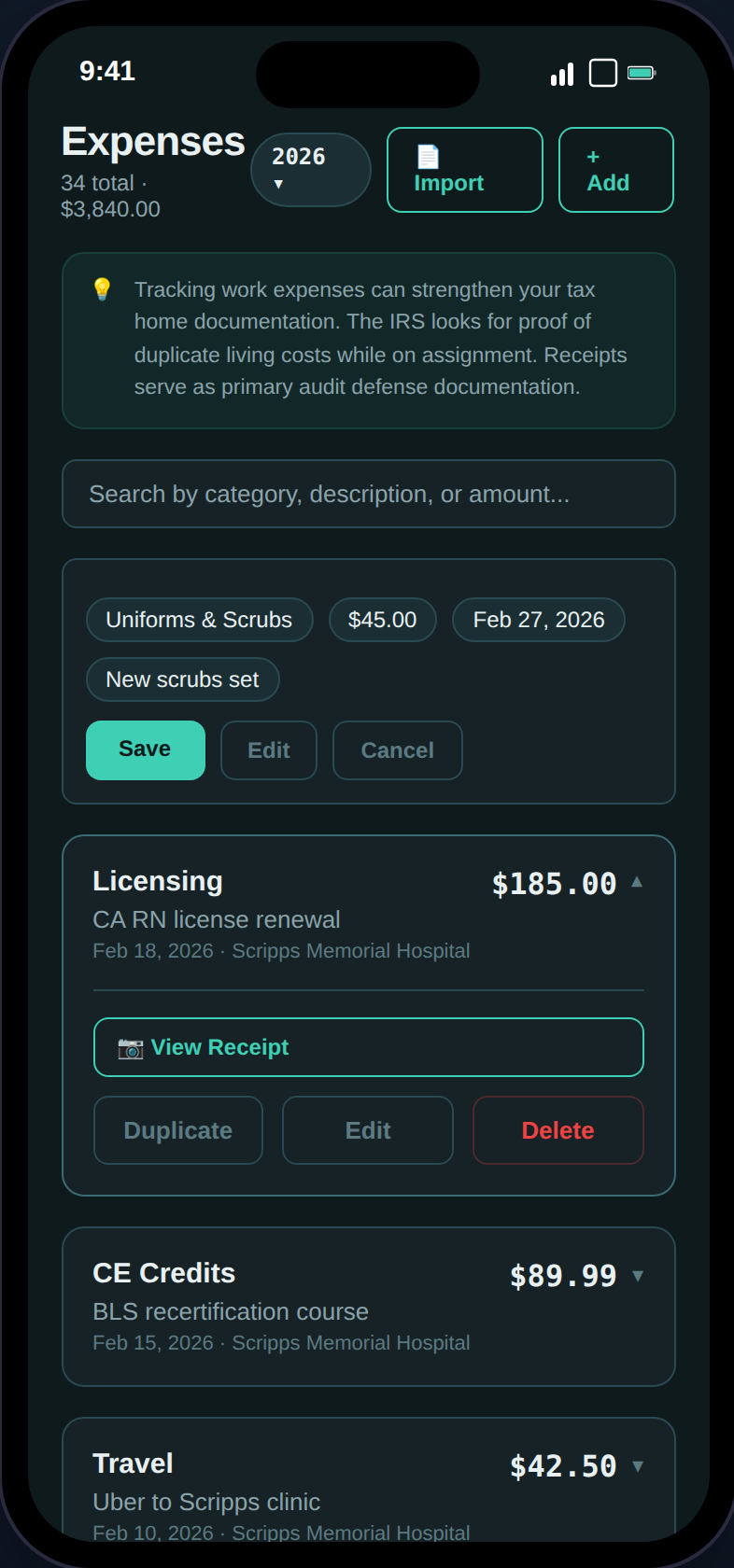
Track deductible work expenses with receipt scanning, category tagging, and bulk CSV import.
**Each assignment card includes:**
* **Compensation Breakdown** — Base pay, housing stipend, M\&IE, bonuses
* **GSA Per Diem Compliance** — Your stipends vs. IRS/GSA limits (daily rates)
* **Housing Adequacy** — Agency stipend vs. local rent (FMR estimate)
* **Stipend Defense Check** — 7-criteria evaluation of whether your stipends are defensible
* **Net Profitability** — Gross compensation minus taxes and linked expenses
* **Housing vs. Stipend Calculator** — Take the cash or accept agency housing?
* **12-Month Rule Badge** — Warns when an assignment approaches or exceeds the IRS limit
* **AI Contract Scanning** — Upload a PDF and auto-extract all 12 fields
***
## Expenses
Track deductible work expenses with receipt scanning, category tagging, and bulk CSV import.
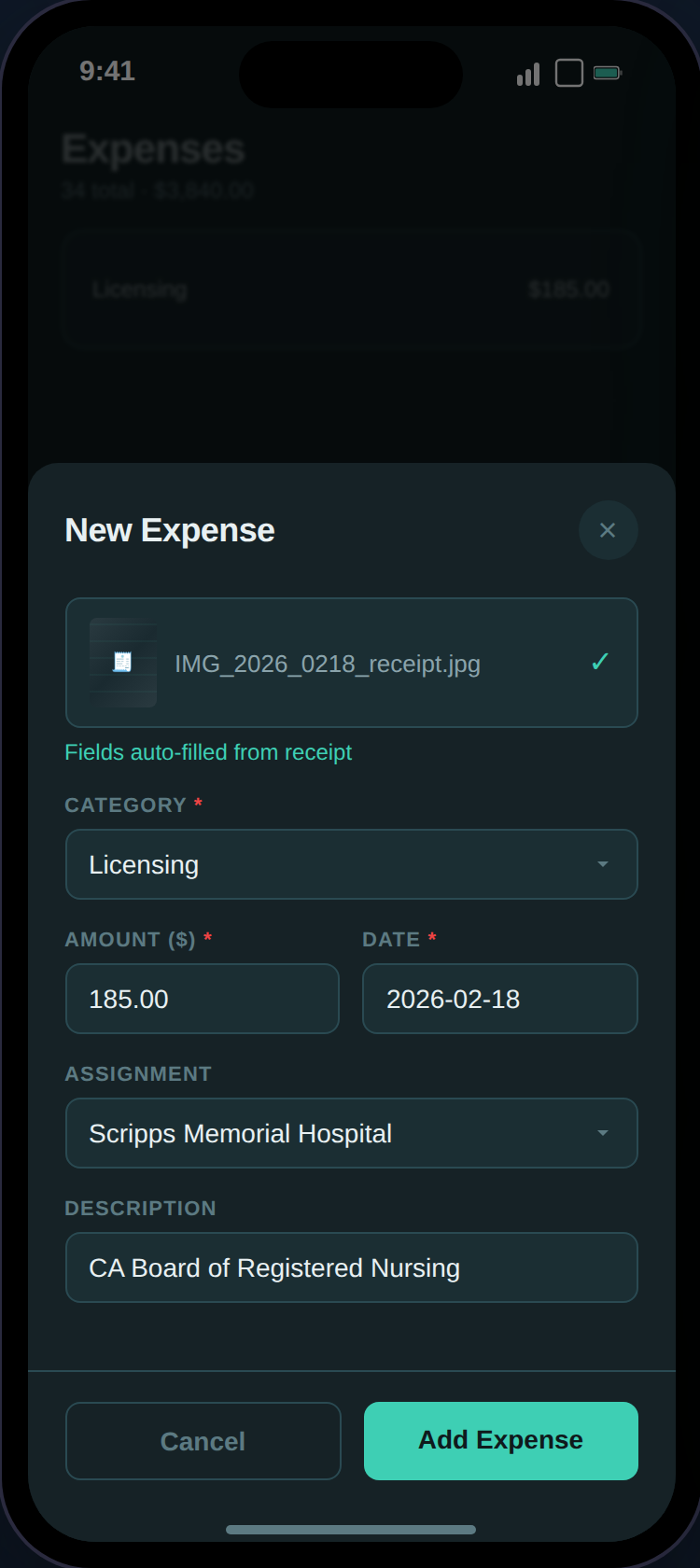
 Upload a photo of any receipt and TaxHomeBase uses AWS Textract to auto-extract the amount, date, vendor name, and suggest a category. Only empty fields get filled — your manual entries are never overwritten.
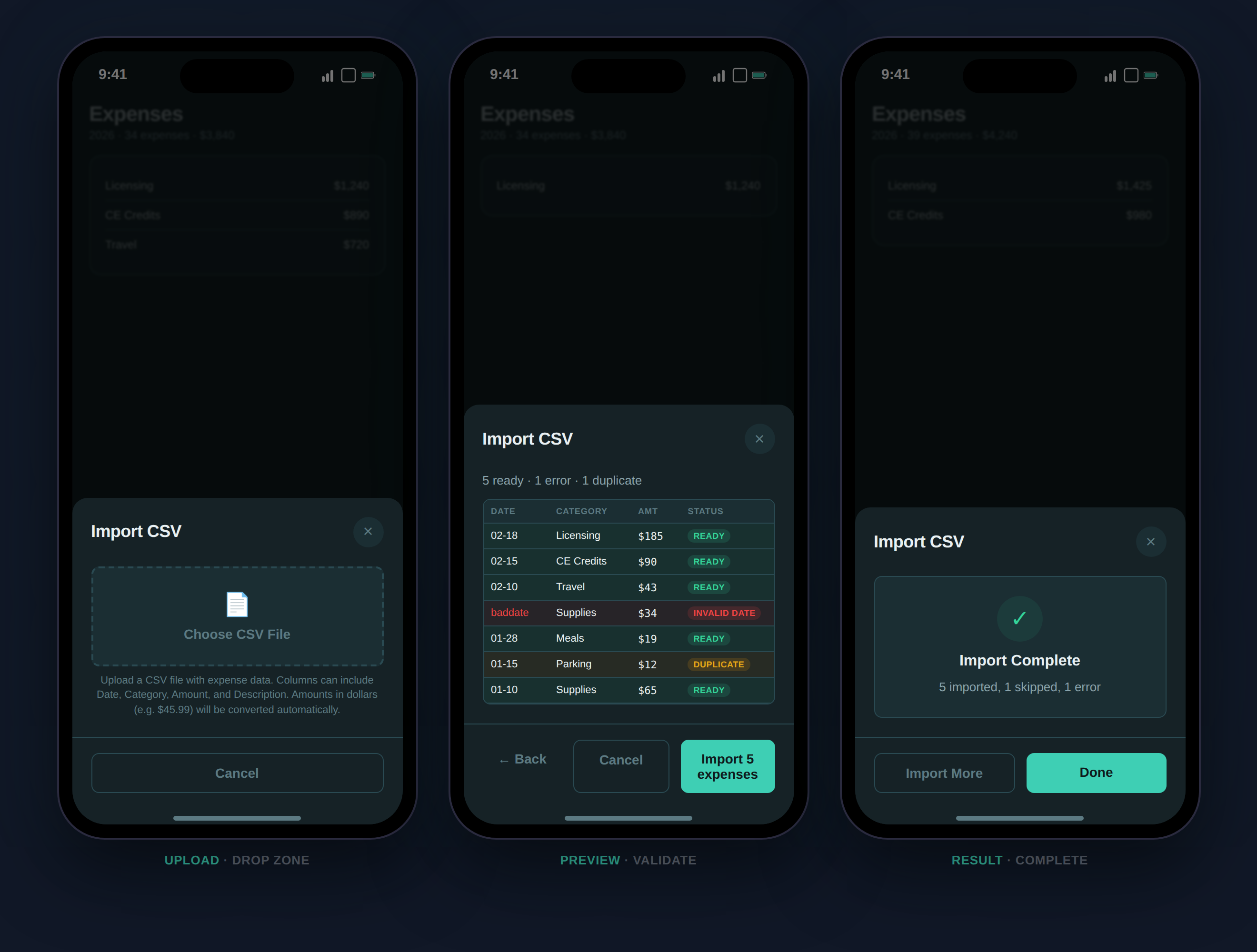
 Already tracking expenses in a spreadsheet? Import them in bulk. The importer auto-detects columns, normalizes categories, flags duplicates, and shows you a color-coded preview before committing.
 ***
## Expense Reports
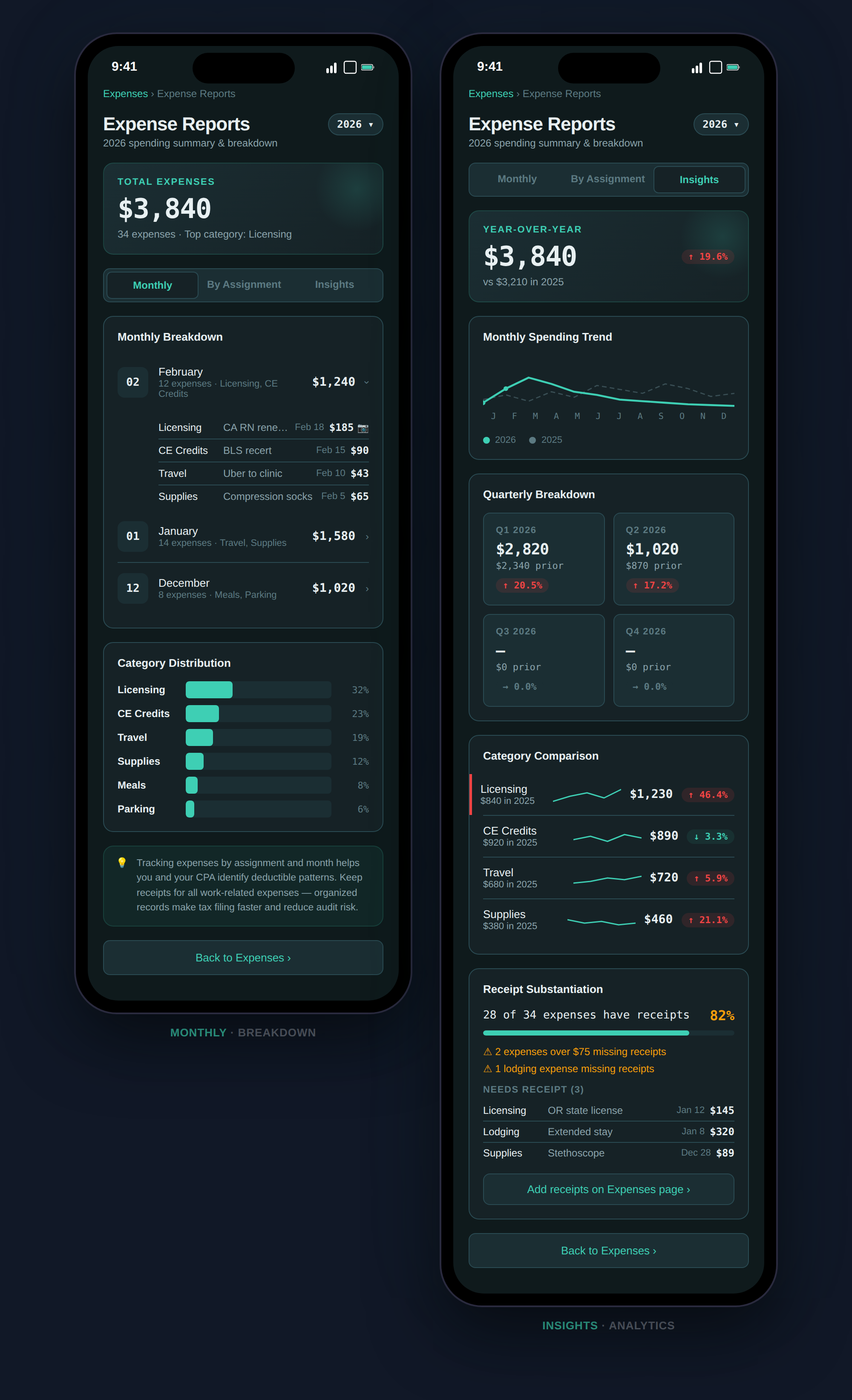
Analyze spending by month, by assignment, and year-over-year. Includes receipt substantiation tracking for IRS compliance.
***
## Expense Reports
Analyze spending by month, by assignment, and year-over-year. Includes receipt substantiation tracking for IRS compliance.
 **Tabs:**
* **Monthly** — Expenses grouped by month with category distribution bars
* **By Assignment** — Expenses linked to each contract
* **Insights** — Year-over-year spending trends, quarterly breakdown, category changes, and flags for 10%+ increases
***
## Mileage
Log work-related trips with IRS standard mileage rates. Every trip contributes to your deduction total.
**Tabs:**
* **Monthly** — Expenses grouped by month with category distribution bars
* **By Assignment** — Expenses linked to each contract
* **Insights** — Year-over-year spending trends, quarterly breakdown, category changes, and flags for 10%+ increases
***
## Mileage
Log work-related trips with IRS standard mileage rates. Every trip contributes to your deduction total.
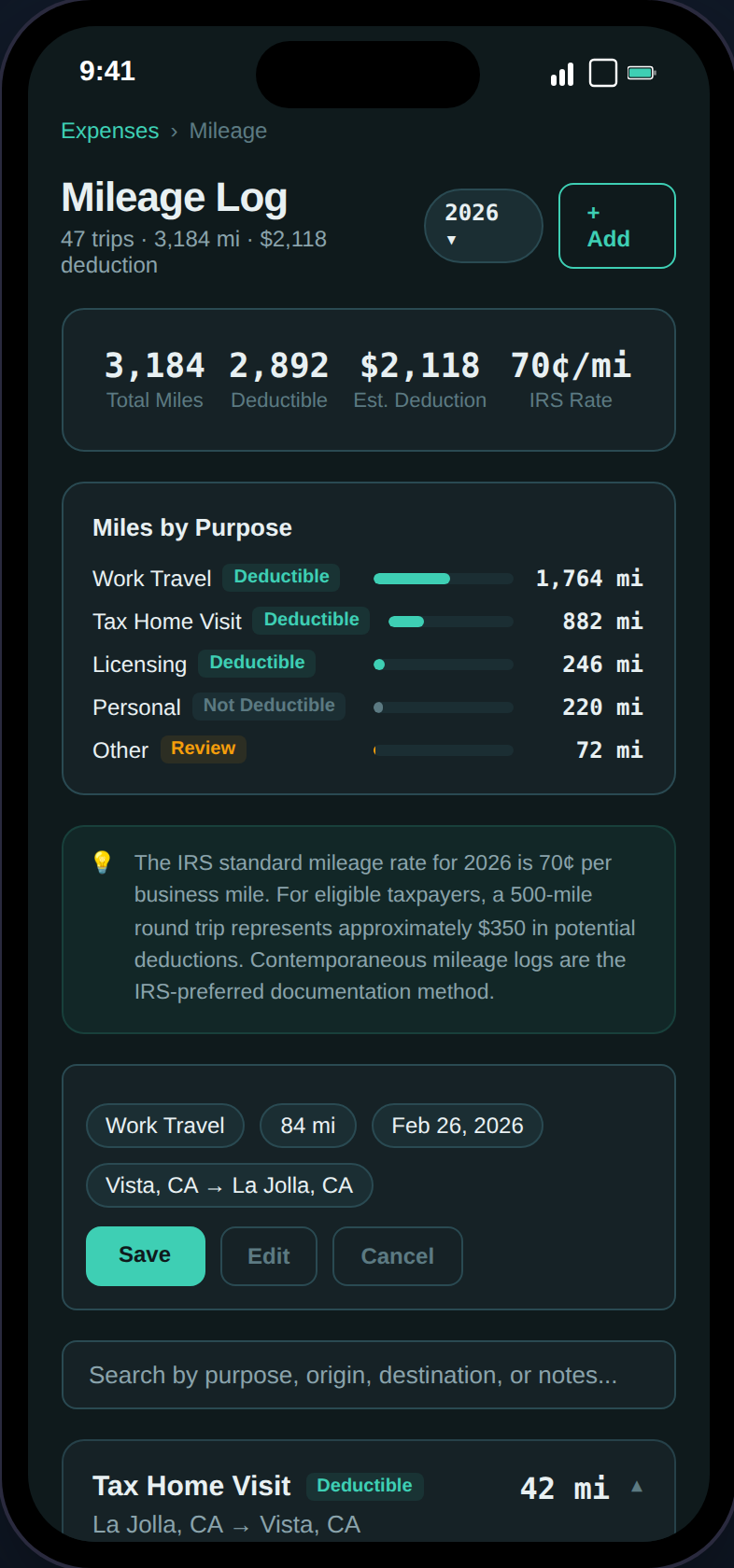 **Features:**
* **Purpose Categories** — Tax home visit, work travel, licensing, other
* **Deduction Calculator** — Automatic computation at the current IRS rate
* **Duplicate Trips** — One-tap duplication for recurring routes
* **Assignment Linking** — Tie trips to specific contracts
***
## Credentials
Track nursing licenses, certifications, and credentials with expiry alerts.
**Features:**
* **Purpose Categories** — Tax home visit, work travel, licensing, other
* **Deduction Calculator** — Automatic computation at the current IRS rate
* **Duplicate Trips** — One-tap duplication for recurring routes
* **Assignment Linking** — Tie trips to specific contracts
***
## Credentials
Track nursing licenses, certifications, and credentials with expiry alerts.
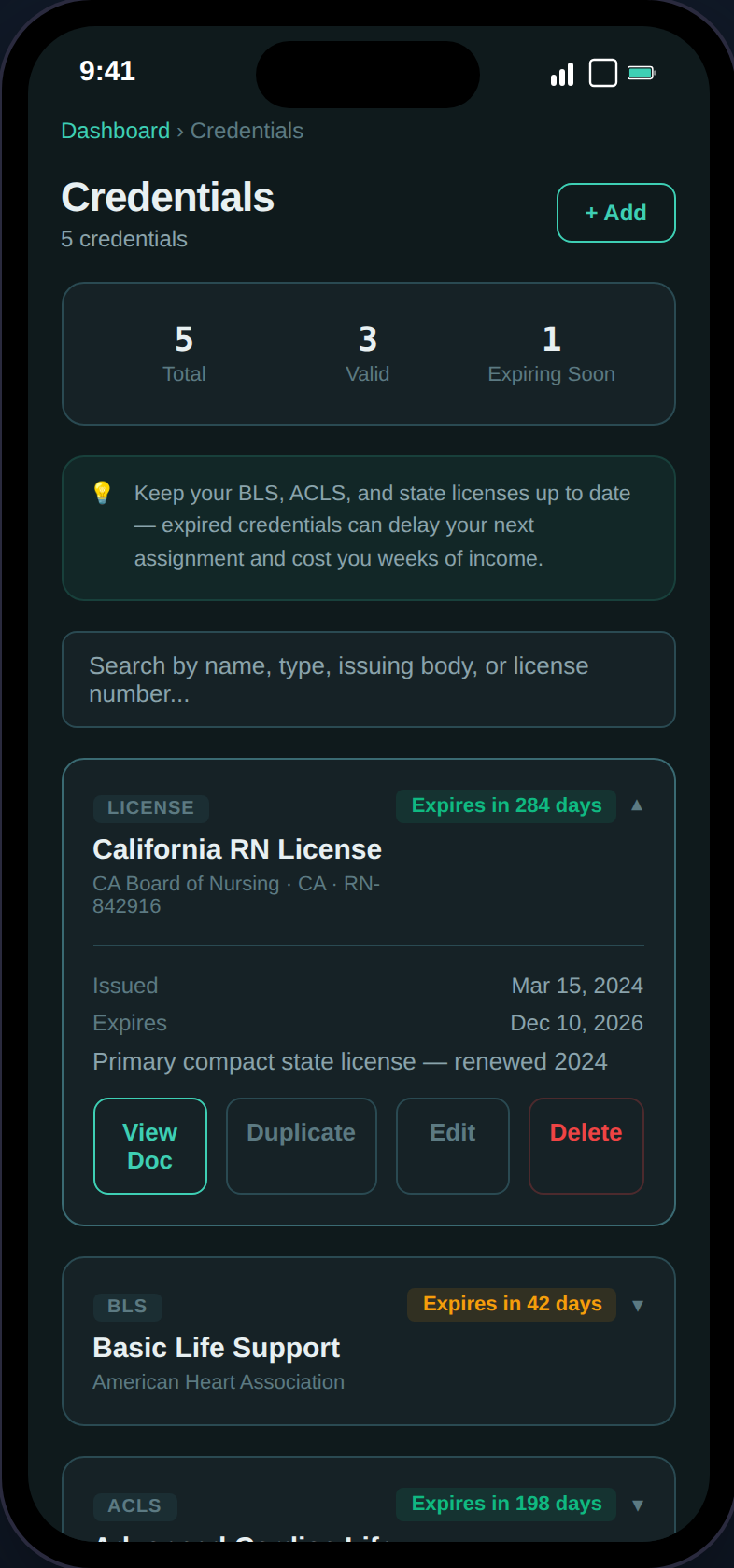 **Features:**
* **Expiry Color-Coding** — Green (>90 days), amber (expiring soon), red (expired)
* **Document Uploads** — Attach scans of licenses and certifications (PDF/JPEG/PNG)
* **Compliance Alerts** — Automatic notifications when credentials are expiring
* **Types** — BLS, ACLS, PALS, state licenses, certifications, and custom
***
## Income Documents
W-2 and 1099 vault with an auto-generated checklist and income reconciliation.
**Features:**
* **Expiry Color-Coding** — Green (>90 days), amber (expiring soon), red (expired)
* **Document Uploads** — Attach scans of licenses and certifications (PDF/JPEG/PNG)
* **Compliance Alerts** — Automatic notifications when credentials are expiring
* **Types** — BLS, ACLS, PALS, state licenses, certifications, and custom
***
## Income Documents
W-2 and 1099 vault with an auto-generated checklist and income reconciliation.
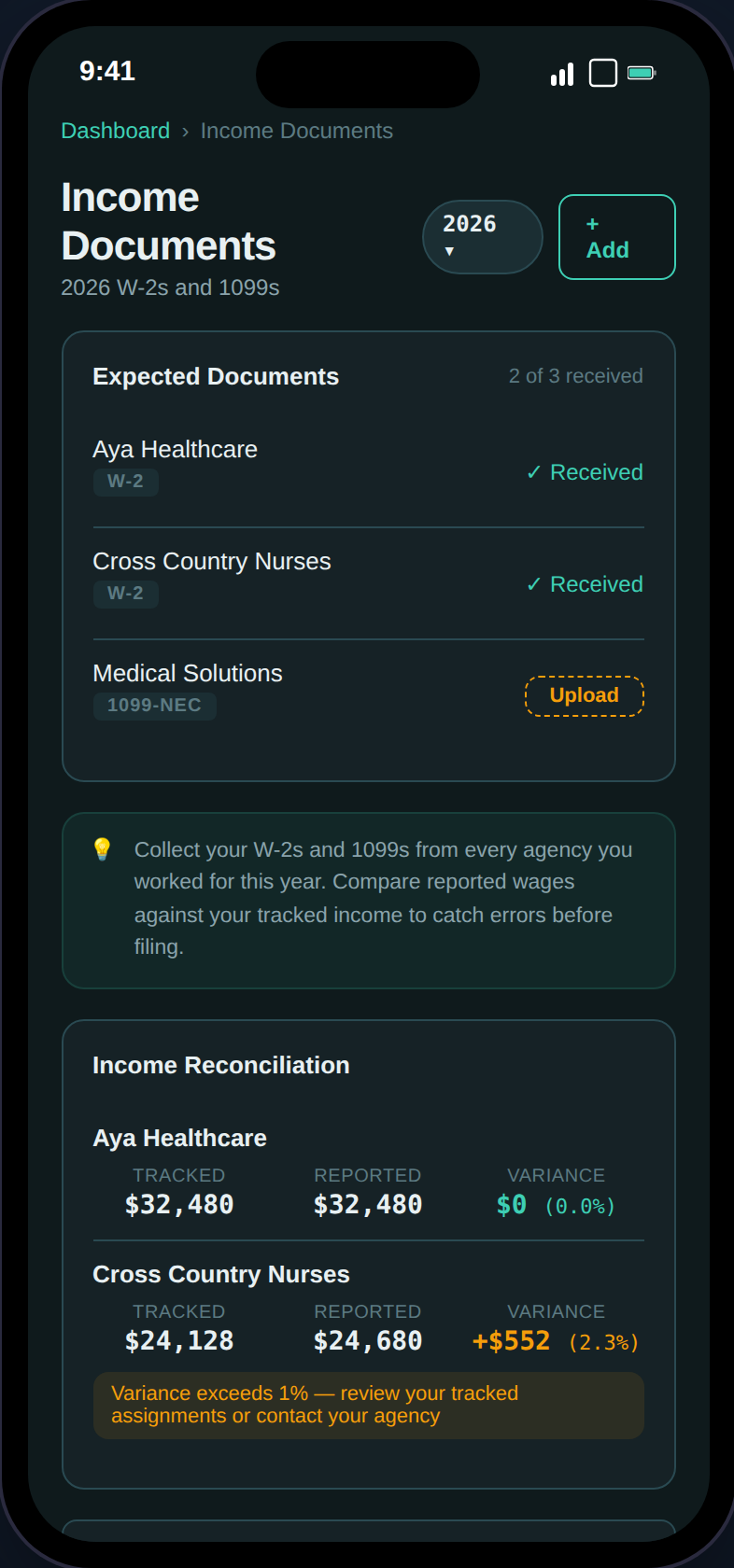 **Features:**
* **Auto-Generated Checklist** — Expected W-2 or 1099 per agency based on your assignments
* **Income Reconciliation** — Tracked income vs. W-2 reported wages with variance percentage
* **Document Uploads** — Attach scans of W-2s and 1099s
* **Export Integration** — The Export page cross-references uploaded income docs in the audit checklist
***
## Audit Vault
Side-by-side comparison of your tax home costs vs. assignment housing — the duplicate living expense evidence the IRS looks for.
**Features:**
* **Auto-Generated Checklist** — Expected W-2 or 1099 per agency based on your assignments
* **Income Reconciliation** — Tracked income vs. W-2 reported wages with variance percentage
* **Document Uploads** — Attach scans of W-2s and 1099s
* **Export Integration** — The Export page cross-references uploaded income docs in the audit checklist
***
## Audit Vault
Side-by-side comparison of your tax home costs vs. assignment housing — the duplicate living expense evidence the IRS looks for.
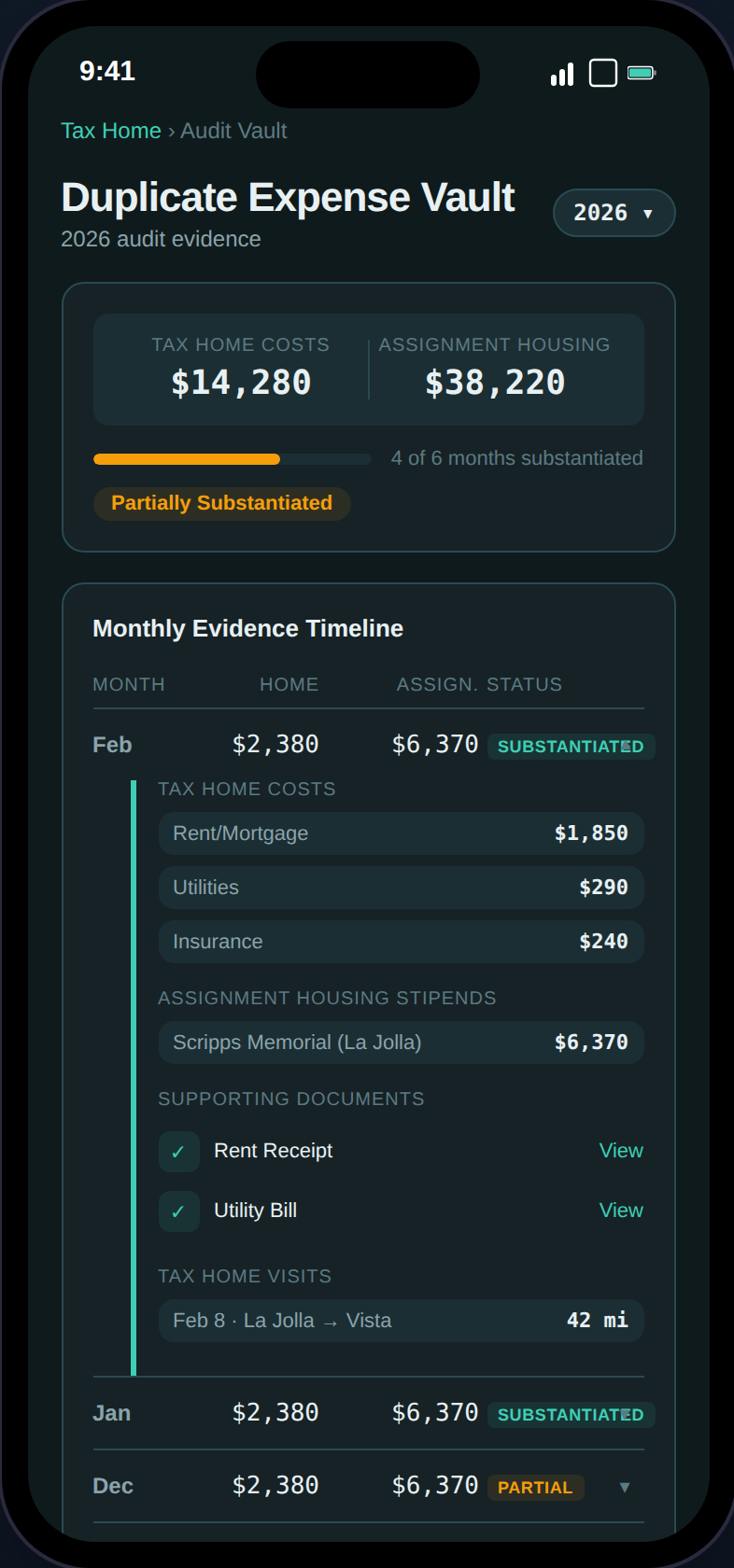 **Features:**
* **Substantiation Badges** — Substantiated (green), Partial (amber), Gap (red) per month
* **Evidence Gap Detection** — Flags months where documentation is missing
* **PDF Export** — One-click audit defense packet
***
## Tax Estimate Pro
Full federal and state tax projection with deduction comparison, quarterly payment tracking, and Social Security impact analysis.
**Features:**
* **Substantiation Badges** — Substantiated (green), Partial (amber), Gap (red) per month
* **Evidence Gap Detection** — Flags months where documentation is missing
* **PDF Export** — One-click audit defense packet
***
## Tax Estimate Pro
Full federal and state tax projection with deduction comparison, quarterly payment tracking, and Social Security impact analysis.
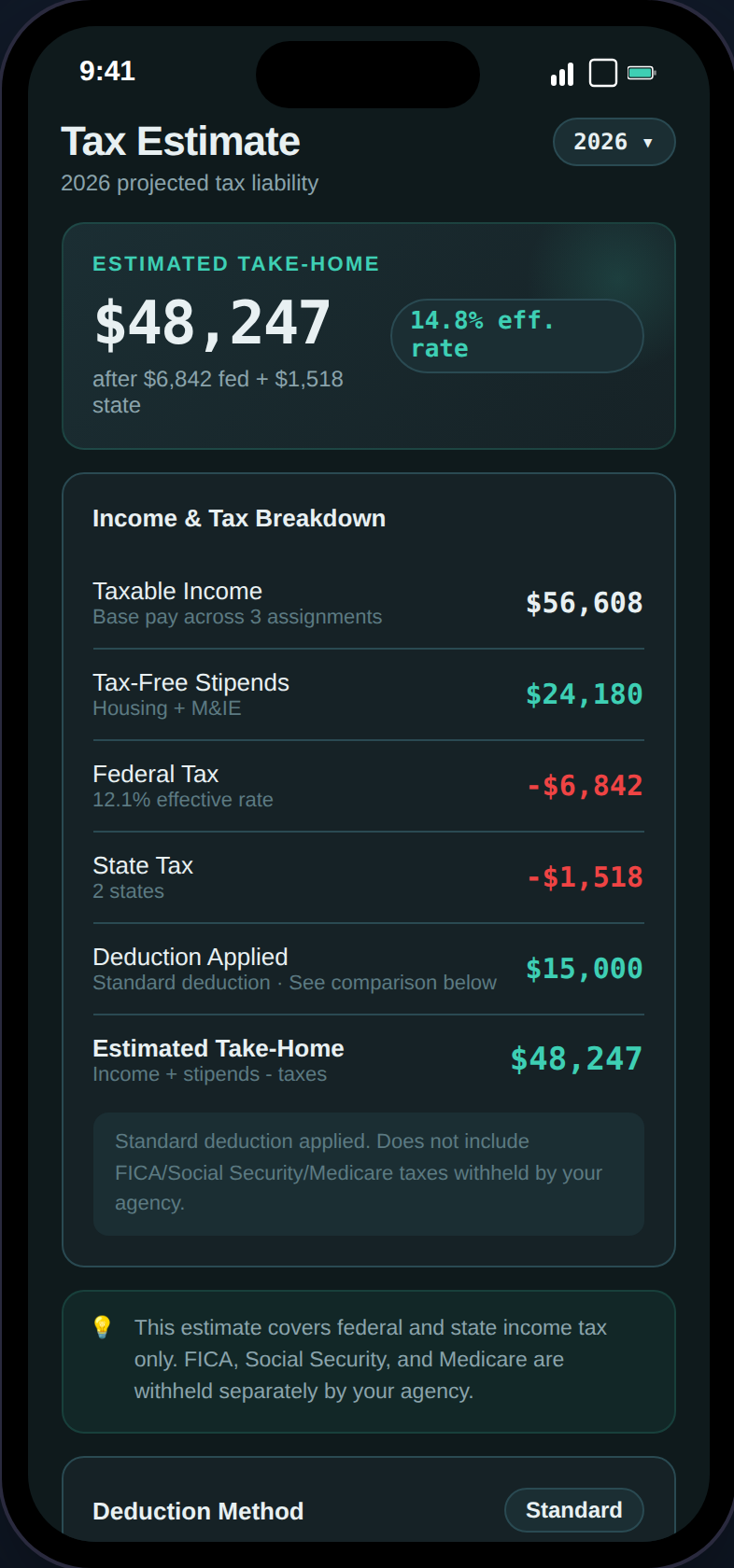 **Sections:**
* **Estimated Take-Home** — After federal, state, and SE tax (1099)
* **Income & Tax Breakdown** — Row-by-row: taxable income, stipends, federal/state tax, deductions
* **Deduction Method** — Standard vs. itemized comparison (W-2) or Schedule C breakdown (1099)
* **Lender Income View** — Shows the gap between W-2 reportable income and actual compensation
* **Social Security Impact** — FICA savings vs. estimated future benefit reduction
* **State Breakdown** — Per-state income, tax, and effective rate with filing status
* **Quarterly Payments** — Track estimated payments with status badges (Paid/Due/Overdue)
* **Audit Readiness** — 100-point weighted checklist with progress ring
***
## State Income Pro
Multi-state income tracking with days worked, reciprocity agreements, and a filing sequence guide.
**Sections:**
* **Estimated Take-Home** — After federal, state, and SE tax (1099)
* **Income & Tax Breakdown** — Row-by-row: taxable income, stipends, federal/state tax, deductions
* **Deduction Method** — Standard vs. itemized comparison (W-2) or Schedule C breakdown (1099)
* **Lender Income View** — Shows the gap between W-2 reportable income and actual compensation
* **Social Security Impact** — FICA savings vs. estimated future benefit reduction
* **State Breakdown** — Per-state income, tax, and effective rate with filing status
* **Quarterly Payments** — Track estimated payments with status badges (Paid/Due/Overdue)
* **Audit Readiness** — 100-point weighted checklist with progress ring
***
## State Income Pro
Multi-state income tracking with days worked, reciprocity agreements, and a filing sequence guide.
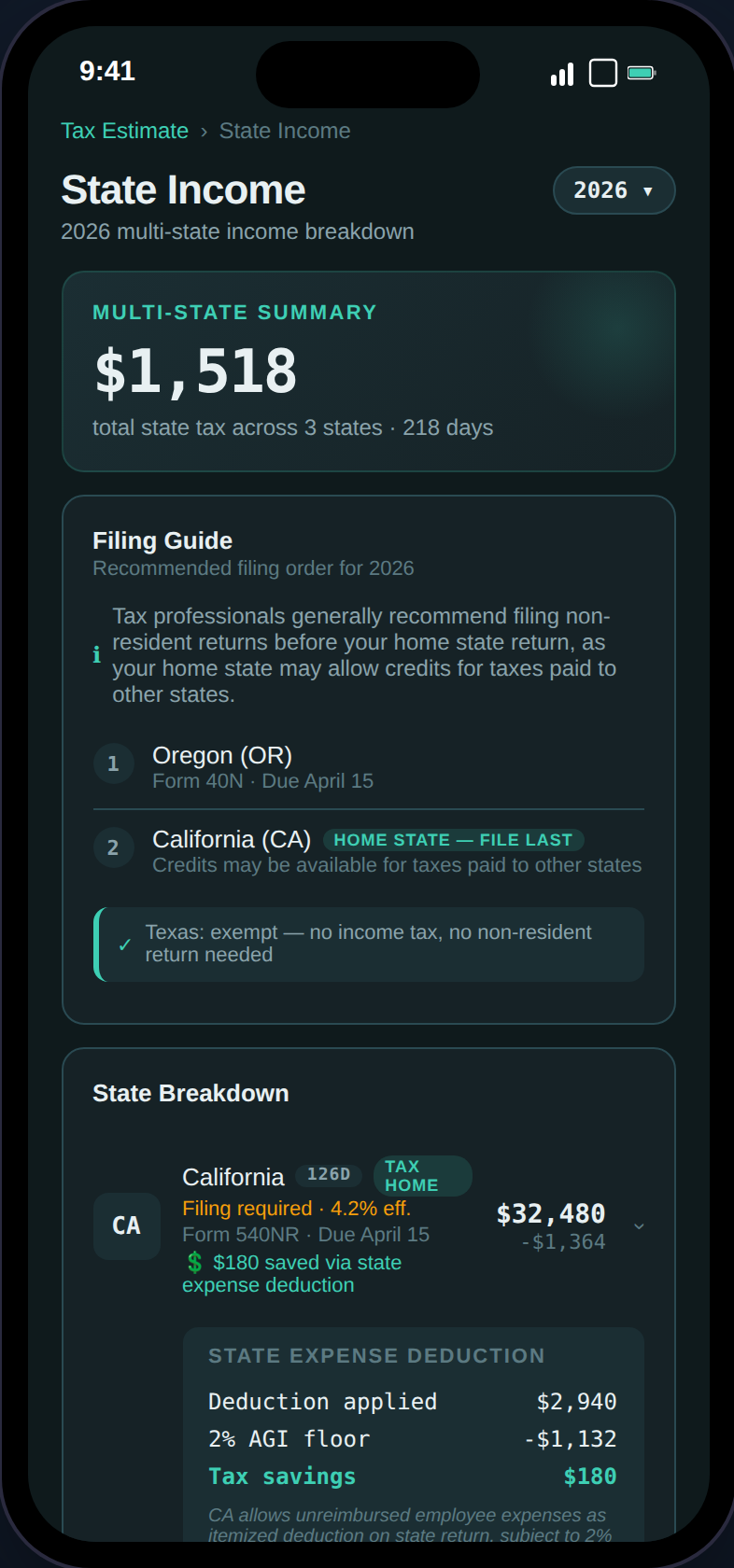 **Features:**
* **Days Per State** — Accumulated from assignment date ranges
* **Reciprocity Agreements** — 16-state reciprocity map; exempt states shown with green badge
* **Filing Sequence Guide** — Numbered steps: non-resident returns first, home state last
* **State Deductions** — NY, CA, AL, HI, AR still allow W-2 expense deductions (TCJA non-conforming)
* **Non-Resident Forms** — Form names and deadlines for every income-tax state
***
## Contract Comparison Pro
Compare two contracts side-by-side with real tax impact and local cost of living.
**Features:**
* **Days Per State** — Accumulated from assignment date ranges
* **Reciprocity Agreements** — 16-state reciprocity map; exempt states shown with green badge
* **Filing Sequence Guide** — Numbered steps: non-resident returns first, home state last
* **State Deductions** — NY, CA, AL, HI, AR still allow W-2 expense deductions (TCJA non-conforming)
* **Non-Resident Forms** — Form names and deadlines for every income-tax state
***
## Contract Comparison Pro
Compare two contracts side-by-side with real tax impact and local cost of living.
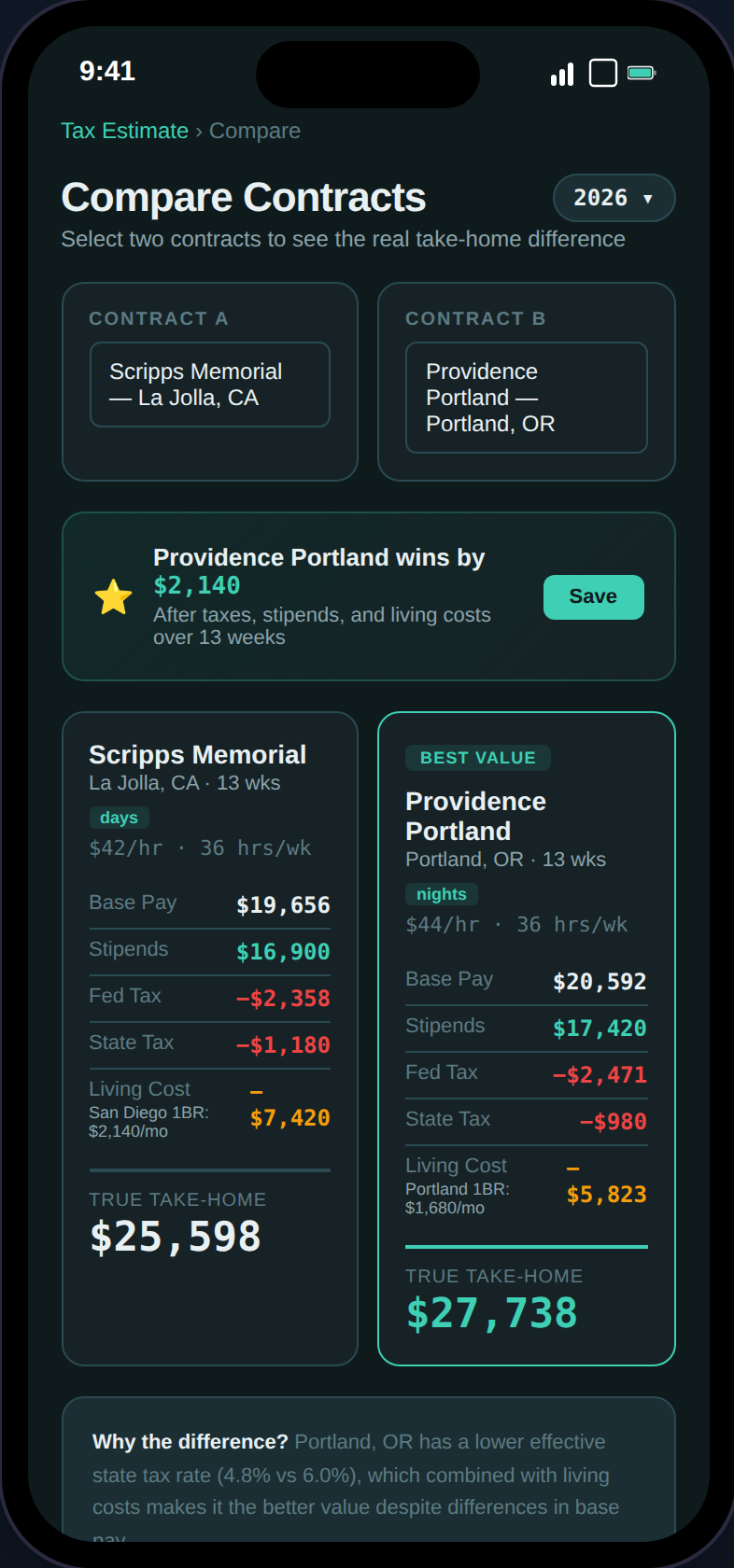 **Features:**
* **Real Tax Impact** — Federal + state tax computed for each contract
* **FMR-Based Living Cost** — HUD Fair Market Rent instead of inflated stipend estimates
* **Hypothetical Contracts** — Enter a contract you're considering (or scan a job ad screenshot)
* **Save & Review** — Saved comparisons are immutable snapshots you can revisit anytime
***
## Export Pro
One-click audit-ready tax package for your CPA.
**Features:**
* **Real Tax Impact** — Federal + state tax computed for each contract
* **FMR-Based Living Cost** — HUD Fair Market Rent instead of inflated stipend estimates
* **Hypothetical Contracts** — Enter a contract you're considering (or scan a job ad screenshot)
* **Save & Review** — Saved comparisons are immutable snapshots you can revisit anytime
***
## Export Pro
One-click audit-ready tax package for your CPA.
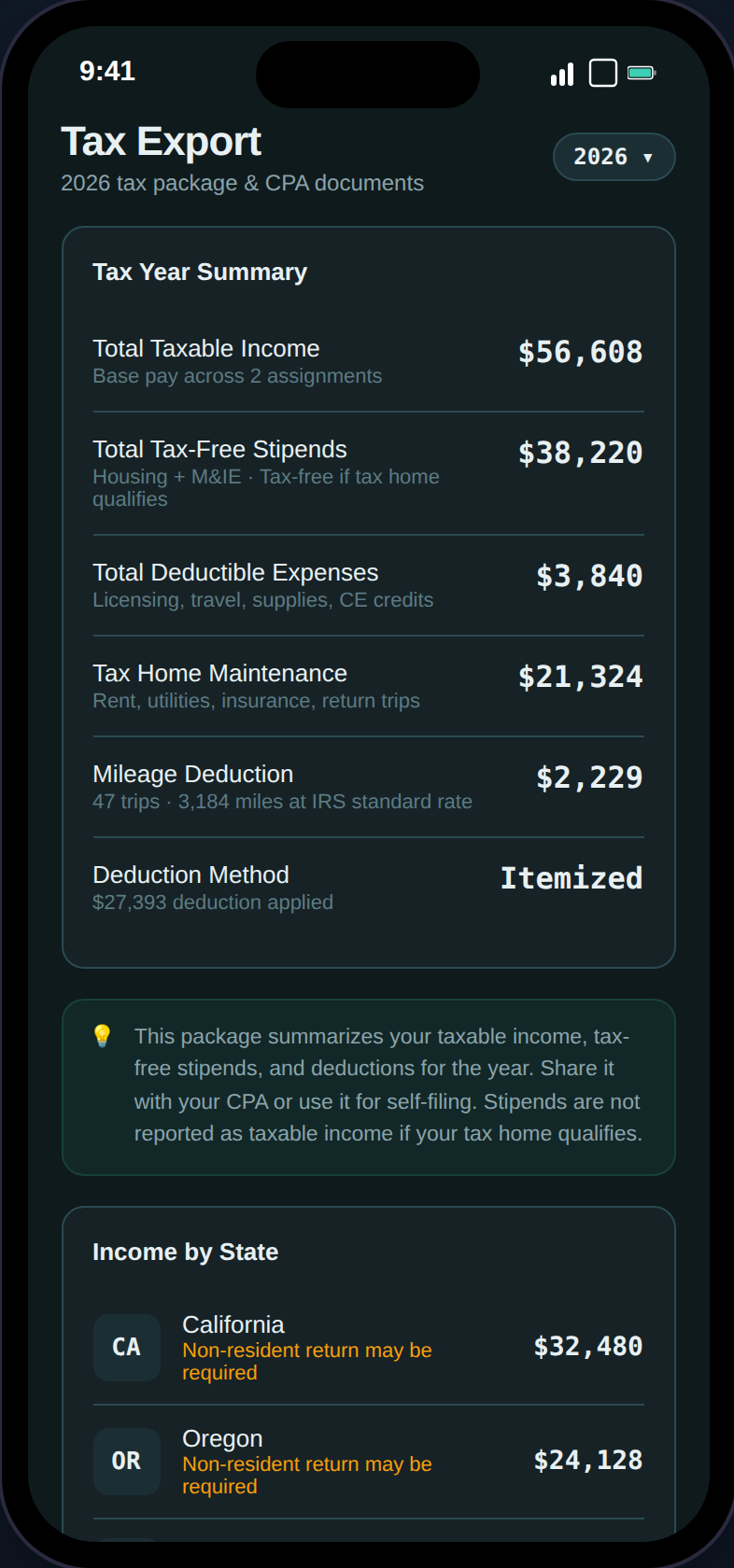 **Export options:**
* **Full Tax Package (PDF)** — Summary, state breakdown, audit checklist, expense insights, GSA compliance, mileage log
* **Expense Detail (CSV)** — All expenses with categories, amounts, dates, and receipt status
* **State Income Breakdown (CSV)** — Per-state income and tax detail
* **Mileage Log (CSV)** — Complete trip log with purpose, origin, destination, and miles
* **Download All (ZIP)** — PDF + all CSVs in a single file
***
## Ready to get started?
Set up your account in 5 steps
Free plan includes 10+ features. Pro unlocks tax estimates and exports.
**Export options:**
* **Full Tax Package (PDF)** — Summary, state breakdown, audit checklist, expense insights, GSA compliance, mileage log
* **Expense Detail (CSV)** — All expenses with categories, amounts, dates, and receipt status
* **State Income Breakdown (CSV)** — Per-state income and tax detail
* **Mileage Log (CSV)** — Complete trip log with purpose, origin, destination, and miles
* **Download All (ZIP)** — PDF + all CSVs in a single file
***
## Ready to get started?
Set up your account in 5 steps
Free plan includes 10+ features. Pro unlocks tax estimates and exports.