> ## Documentation Index
> Fetch the complete documentation index at: https://docs.taxhomebase.com/llms.txt
> Use this file to discover all available pages before exploring further.
# Income Documents
> Track W-2s and 1099s from every agency with auto-generated checklists and income reconciliation.
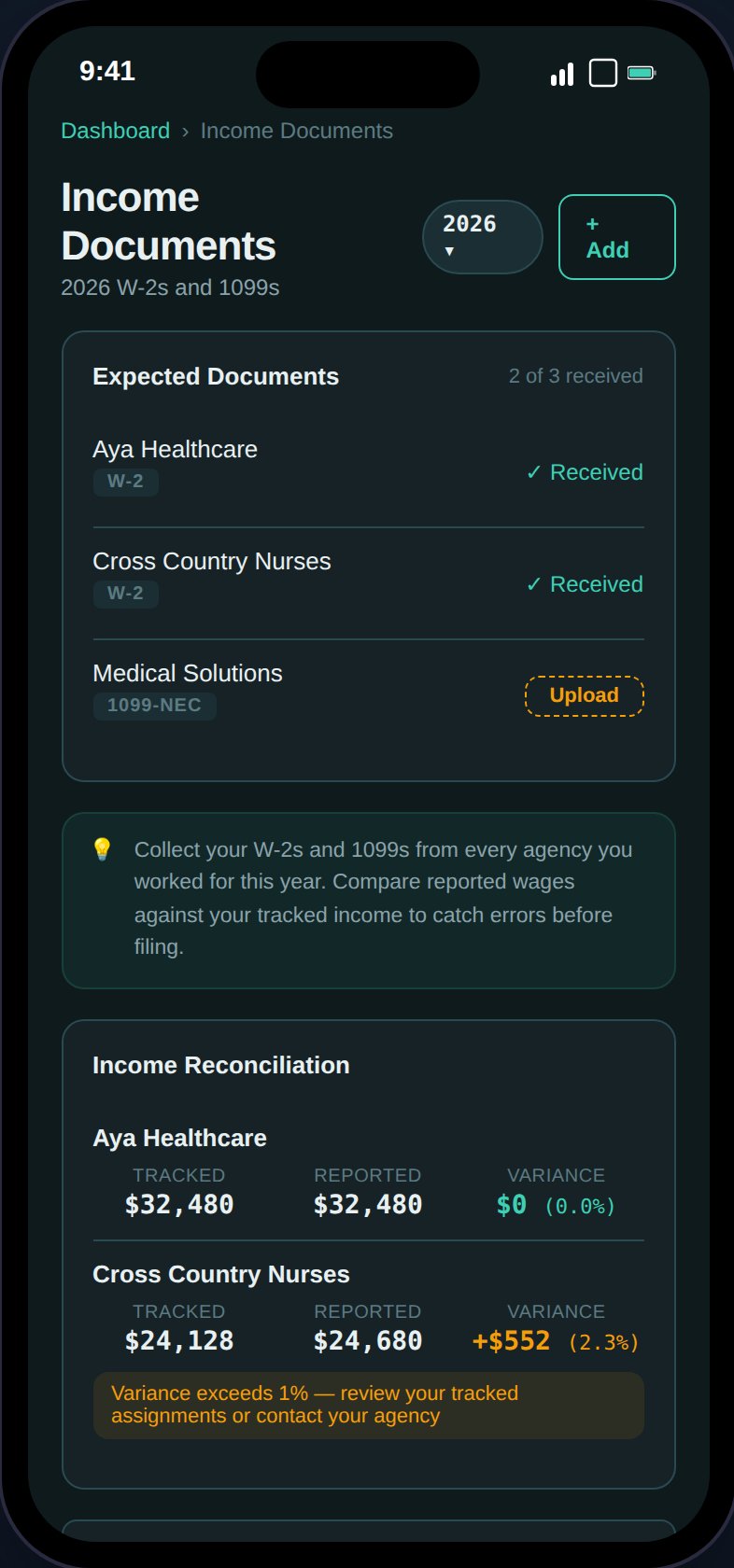
The Income Documents page is your W-2/1099 vault. It auto-generates a checklist of expected documents based on your assignments and helps you reconcile reported wages.
 ## Agency Checklist
TaxHomeBase cross-references your assignments to show expected documents:
* One row per unique agency from your assignments
* Expected document type based on your employment type (W-2 for W-2 employees, 1099-NEC for 1099 contractors)
* **Received** or **Missing** status
* "Upload" button on missing items opens a pre-filled form
## Income Reconciliation
For each agency with an uploaded document, TaxHomeBase compares:
* **Tracked income** — Sum of base pay from assignments with that agency
* **Reported wages** — The wages amount from the uploaded W-2/1099
The comparison shows:
* Variance amount (absolute difference)
* Variance percentage
* **Green** if within 1%
* **Amber** if >1% discrepancy
Small variances are normal — agencies may include orientation pay, overtime, or adjust dates differently. Large variances (>5%) should be investigated.
## Adding an Income Document
## Agency Checklist
TaxHomeBase cross-references your assignments to show expected documents:
* One row per unique agency from your assignments
* Expected document type based on your employment type (W-2 for W-2 employees, 1099-NEC for 1099 contractors)
* **Received** or **Missing** status
* "Upload" button on missing items opens a pre-filled form
## Income Reconciliation
For each agency with an uploaded document, TaxHomeBase compares:
* **Tracked income** — Sum of base pay from assignments with that agency
* **Reported wages** — The wages amount from the uploaded W-2/1099
The comparison shows:
* Variance amount (absolute difference)
* Variance percentage
* **Green** if within 1%
* **Amber** if >1% discrepancy
Small variances are normal — agencies may include orientation pay, overtime, or adjust dates differently. Large variances (>5%) should be investigated.
## Adding an Income Document
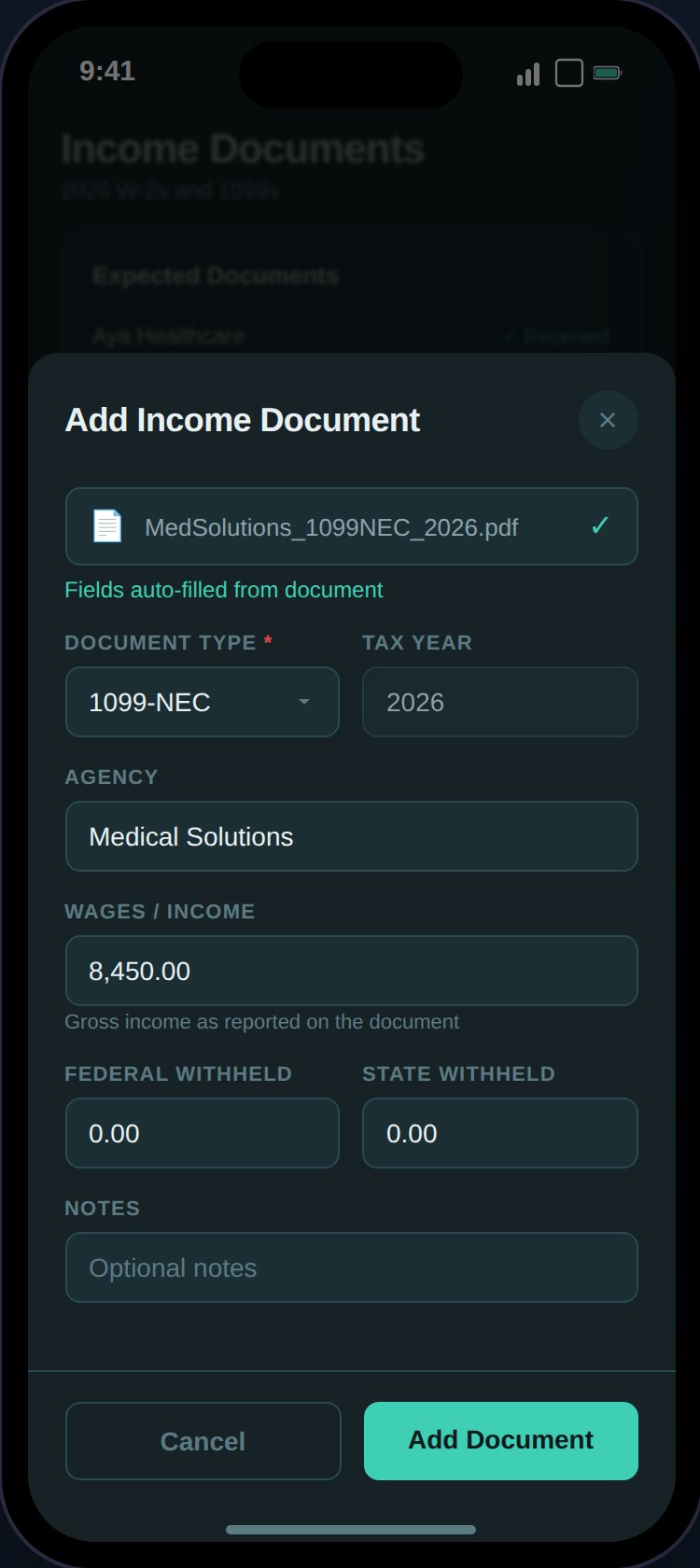 Tap the **+** button or click "Upload" on a missing checklist item. Fields:
| Field | Required | Description |
| -------------------- | -------- | ------------------------------------------------------ |
| **Document Type** | Yes | w2, 1099\_nec, or 1099\_misc |
| **Tax Year** | Yes | The tax year on the document |
| **Agency** | No | Agency name (autocomplete from assignments) |
| **Wages** | No | Total wages reported (dollars, stored as cents) |
| **Federal Withheld** | No | Federal income tax withheld (dollars, stored as cents) |
| **State Withheld** | No | State income tax withheld (dollars, stored as cents) |
| **Document** | No | Upload the actual W-2/1099 (PDF, JPEG, PNG, max 10MB) |
| **Notes** | No | Additional context (max 1000 chars) |
## Document Management
* Expandable cards with type badge, agency, and key numbers
* "View Document" button for uploaded files
* Edit, delete (with undo), and restore actions
* Client-side search by agency, document type, and notes
## Integration with Export
The [Export page](/guides/export) W-2 checklist cross-references uploaded income documents:
* Shows reported wages if the document is uploaded
* Shows "Upload W-2 from {agency}" with a link if missing
Tap the **+** button or click "Upload" on a missing checklist item. Fields:
| Field | Required | Description |
| -------------------- | -------- | ------------------------------------------------------ |
| **Document Type** | Yes | w2, 1099\_nec, or 1099\_misc |
| **Tax Year** | Yes | The tax year on the document |
| **Agency** | No | Agency name (autocomplete from assignments) |
| **Wages** | No | Total wages reported (dollars, stored as cents) |
| **Federal Withheld** | No | Federal income tax withheld (dollars, stored as cents) |
| **State Withheld** | No | State income tax withheld (dollars, stored as cents) |
| **Document** | No | Upload the actual W-2/1099 (PDF, JPEG, PNG, max 10MB) |
| **Notes** | No | Additional context (max 1000 chars) |
## Document Management
* Expandable cards with type badge, agency, and key numbers
* "View Document" button for uploaded files
* Edit, delete (with undo), and restore actions
* Client-side search by agency, document type, and notes
## Integration with Export
The [Export page](/guides/export) W-2 checklist cross-references uploaded income documents:
* Shows reported wages if the document is uploaded
* Shows "Upload W-2 from {agency}" with a link if missing