> ## Documentation Index
> Fetch the complete documentation index at: https://docs.taxhomebase.com/llms.txt
> Use this file to discover all available pages before exploring further.
# Export
> Generate audit-ready tax packages with PDF, CSV, and ZIP download options.
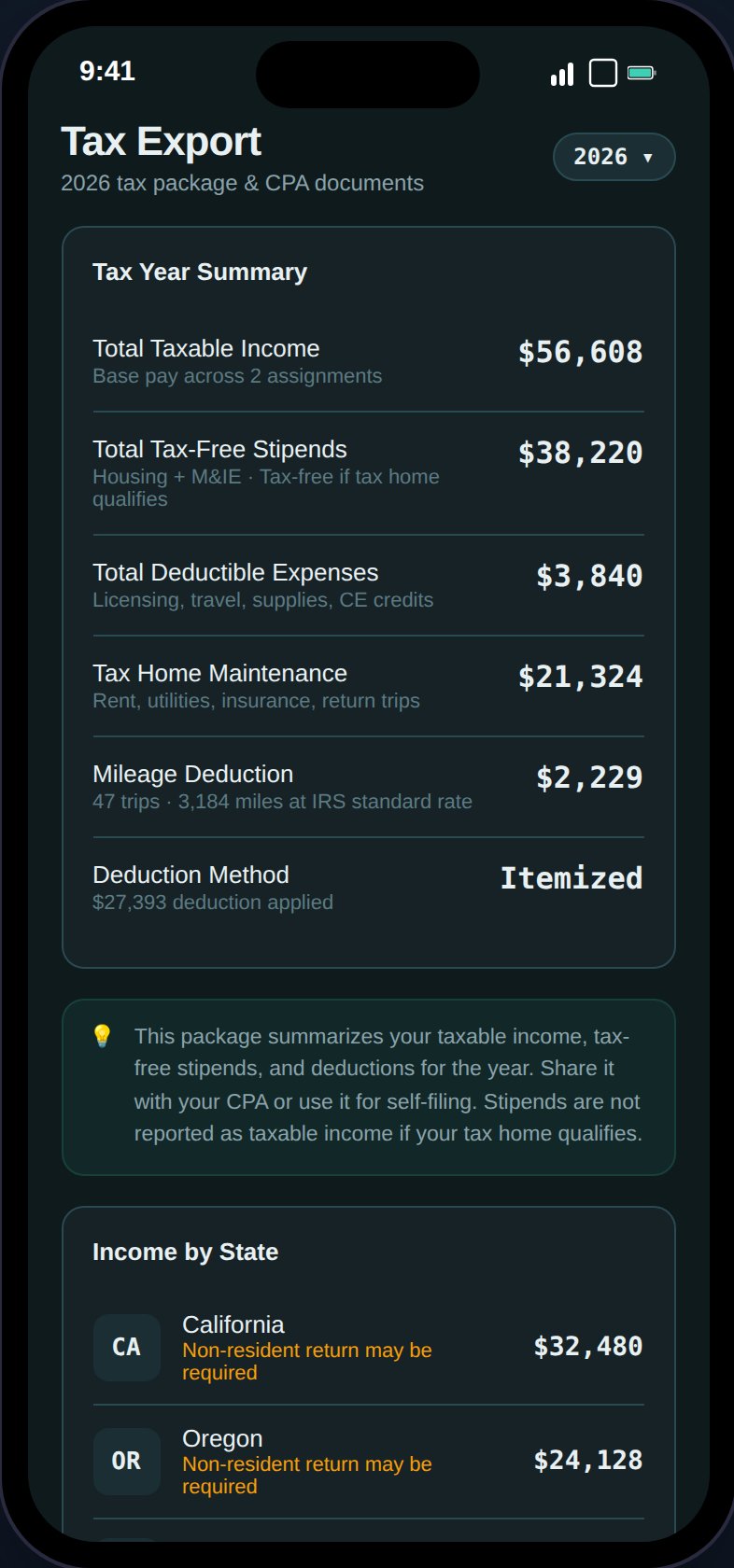
The Export page generates your year-end tax package — everything you need for your CPA or in case of an IRS audit.
 ## Export Options
| Export | Format | Contents |
| -------------------------- | ------ | ------------------------------------------------------------------------------------------------ |
| **Full Tax Package** | PDF | Summary, state breakdown, audit defense checklist, expense insights, GSA compliance, mileage log |
| **Expense Detail** | CSV | All expenses with category, amount, date, description |
| **State Income Breakdown** | CSV | Per-state income, tax, effective rate, days |
| **Mileage Log** | CSV | All trips with date, miles, purpose, origin, destination |
| **Download All** | ZIP | PDF + all CSVs bundled together |
Export buttons are individually disabled when their data source is empty, with an explanatory message.
## Audit Defense Checklist
A dynamic checklist card between the state breakdown and export options:
### Audit Readiness Score
A progress ring at the top showing X/11 criteria met:
* 11/11: "Audit ready"
* Less than 11: "Action needed"
### Checklist Items
Items are derived from your data and show green (ready) or amber (action needed):
* **Federal return** — Always shown
* **W-2 per agency** — One row per unique agency from your assignments; cross-references uploaded income documents
* **Non-resident state returns** — One per income-tax state, with form name
* **Tax home documents** — Whether supporting docs are uploaded
* **Expense receipts** — Receipt coverage with three-tier status (IRS-flagged missing, ready, 100% coverage)
* **Mileage log** — Whether mileage trips are recorded
* **Tax home cost records** — Whether maintenance costs are tracked
* **GSA per diem compliance** — Whether all assignments are within limits
A progress line shows "{X} of {Y} items ready."
## PDF Contents
The full tax package PDF includes:
1. **Summary** — Taxable income, stipends, deductions, tax breakdown, take-home
2. **State Breakdown** — Per-state income, tax, effective rate
3. **Audit Defense Checklist** — Same as the on-screen version
4. **Expense Insights** — YoY summary table, quarterly breakdown, category comparison (only when previous year data exists)
5. **GSA Per Diem Compliance** — Per-assignment table: facility, location, GSA area, daily rates comparison, status
6. **Mileage Log** — Trip list with dates, miles, purpose, origin, destination
## W-2 Checklist
The export page cross-references your uploaded income documents:
* **Uploaded**: Shows the reported wages from the uploaded W-2/1099
* **Missing**: Shows "Upload W-2 from {agency}" with a link to the Income Documents page
## Export Options
| Export | Format | Contents |
| -------------------------- | ------ | ------------------------------------------------------------------------------------------------ |
| **Full Tax Package** | PDF | Summary, state breakdown, audit defense checklist, expense insights, GSA compliance, mileage log |
| **Expense Detail** | CSV | All expenses with category, amount, date, description |
| **State Income Breakdown** | CSV | Per-state income, tax, effective rate, days |
| **Mileage Log** | CSV | All trips with date, miles, purpose, origin, destination |
| **Download All** | ZIP | PDF + all CSVs bundled together |
Export buttons are individually disabled when their data source is empty, with an explanatory message.
## Audit Defense Checklist
A dynamic checklist card between the state breakdown and export options:
### Audit Readiness Score
A progress ring at the top showing X/11 criteria met:
* 11/11: "Audit ready"
* Less than 11: "Action needed"
### Checklist Items
Items are derived from your data and show green (ready) or amber (action needed):
* **Federal return** — Always shown
* **W-2 per agency** — One row per unique agency from your assignments; cross-references uploaded income documents
* **Non-resident state returns** — One per income-tax state, with form name
* **Tax home documents** — Whether supporting docs are uploaded
* **Expense receipts** — Receipt coverage with three-tier status (IRS-flagged missing, ready, 100% coverage)
* **Mileage log** — Whether mileage trips are recorded
* **Tax home cost records** — Whether maintenance costs are tracked
* **GSA per diem compliance** — Whether all assignments are within limits
A progress line shows "{X} of {Y} items ready."
## PDF Contents
The full tax package PDF includes:
1. **Summary** — Taxable income, stipends, deductions, tax breakdown, take-home
2. **State Breakdown** — Per-state income, tax, effective rate
3. **Audit Defense Checklist** — Same as the on-screen version
4. **Expense Insights** — YoY summary table, quarterly breakdown, category comparison (only when previous year data exists)
5. **GSA Per Diem Compliance** — Per-assignment table: facility, location, GSA area, daily rates comparison, status
6. **Mileage Log** — Trip list with dates, miles, purpose, origin, destination
## W-2 Checklist
The export page cross-references your uploaded income documents:
* **Uploaded**: Shows the reported wages from the uploaded W-2/1099
* **Missing**: Shows "Upload W-2 from {agency}" with a link to the Income Documents page