> ## Documentation Index
> Fetch the complete documentation index at: https://docs.taxhomebase.com/llms.txt
> Use this file to discover all available pages before exploring further.
# Expenses
> Track deductible expenses with receipt scanning, CSV import, and detailed reporting.
The Expenses page lets you log, categorize, and manage work-related expenses. Expenses feed into tax calculations, profitability analysis, and your audit-ready export package.
 ## Adding an Expense
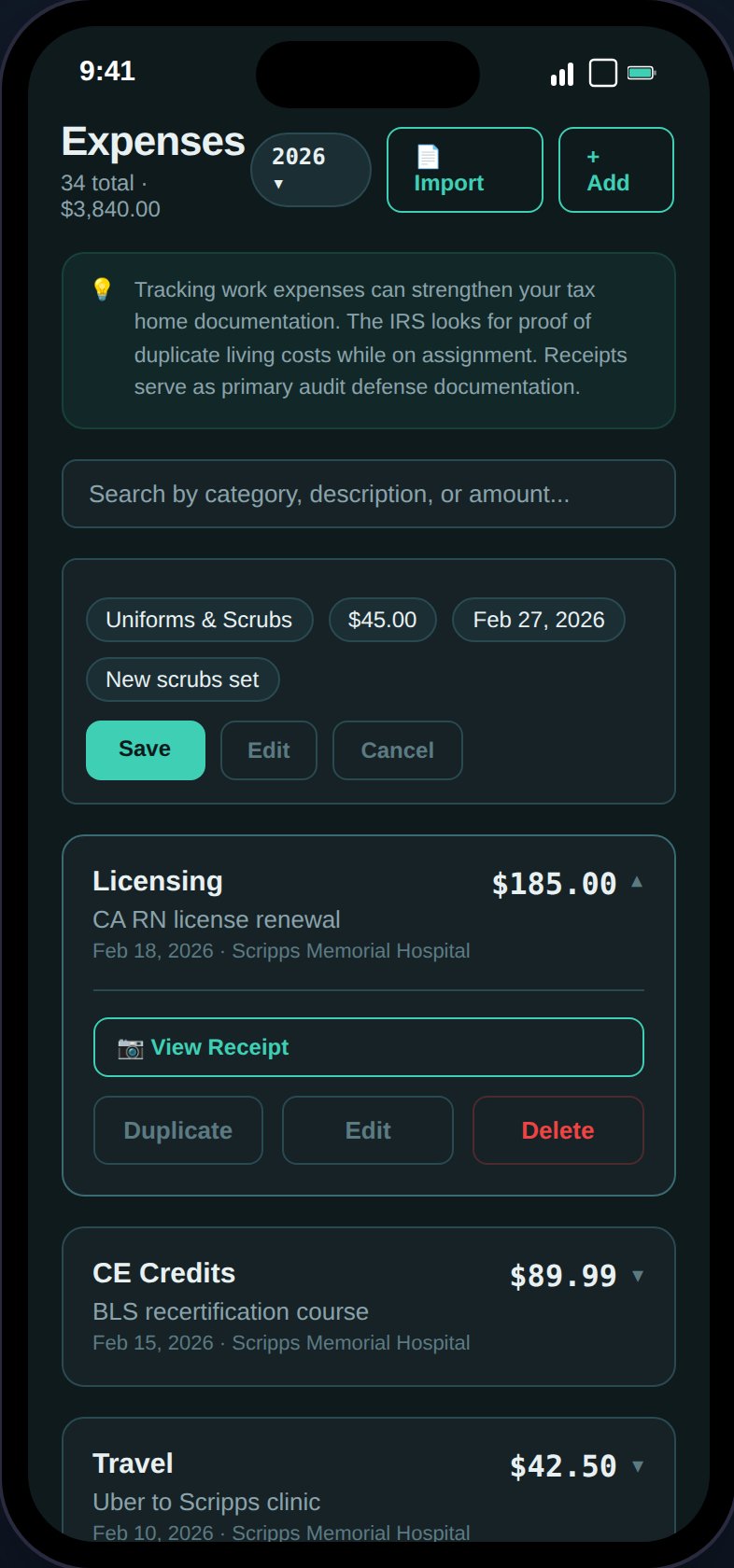
Tap the **+** button to open the expense form. Fields:
| Field | Required | Description |
| --------------- | -------- | ------------------------------------ |
| **Category** | Yes | One of 13 expense categories |
| **Amount** | Yes | Dollar amount (stored as cents) |
| **Date** | Yes | Date the expense was incurred |
| **Assignment** | No | Link to a specific assignment |
| **Description** | No | Vendor name or notes (max 500 chars) |
| **Receipt** | No | Photo of receipt for substantiation |
### Expense Categories
| Category | Description |
| ---------------- | -------------------------------------------- |
| `travel` | Flights, gas, tolls, parking for work travel |
| `licensing` | State license fees, compact license |
| `supplies` | Stethoscopes, scrubs, medical equipment |
| `ce_credits` | Continuing education courses |
| `meals` | Work-related meals (subject to IRS limits) |
| `lodging` | Temporary housing at assignment |
| `uniforms` | Required work clothing |
| `insurance` | Professional liability insurance |
| `dues` | Professional association memberships |
| `parking` | Parking at work facility |
| `phone_internet` | Work-use portion of phone/internet |
| `tax_prep` | Tax preparation fees |
| `other` | Miscellaneous deductible expenses |
## Receipt Scanning
In create mode, use **Scan Receipt** to photograph a receipt and auto-fill fields:
JPEG or PNG, up to 10MB. The image is uploaded to S3.
AWS Textract extracts the total amount, date, vendor name, and suggests a category based on keywords.
Only empty fields are populated — your manual entries are preserved. Review and adjust as needed.
After saving, the receipt is linked to the expense. View it anytime via the camera icon on the expense card.
See [Receipt Scanning](/guides/receipt-scanning) for the full workflow.
## CSV Import
## Adding an Expense
Tap the **+** button to open the expense form. Fields:
| Field | Required | Description |
| --------------- | -------- | ------------------------------------ |
| **Category** | Yes | One of 13 expense categories |
| **Amount** | Yes | Dollar amount (stored as cents) |
| **Date** | Yes | Date the expense was incurred |
| **Assignment** | No | Link to a specific assignment |
| **Description** | No | Vendor name or notes (max 500 chars) |
| **Receipt** | No | Photo of receipt for substantiation |
### Expense Categories
| Category | Description |
| ---------------- | -------------------------------------------- |
| `travel` | Flights, gas, tolls, parking for work travel |
| `licensing` | State license fees, compact license |
| `supplies` | Stethoscopes, scrubs, medical equipment |
| `ce_credits` | Continuing education courses |
| `meals` | Work-related meals (subject to IRS limits) |
| `lodging` | Temporary housing at assignment |
| `uniforms` | Required work clothing |
| `insurance` | Professional liability insurance |
| `dues` | Professional association memberships |
| `parking` | Parking at work facility |
| `phone_internet` | Work-use portion of phone/internet |
| `tax_prep` | Tax preparation fees |
| `other` | Miscellaneous deductible expenses |
## Receipt Scanning
In create mode, use **Scan Receipt** to photograph a receipt and auto-fill fields:
JPEG or PNG, up to 10MB. The image is uploaded to S3.
AWS Textract extracts the total amount, date, vendor name, and suggests a category based on keywords.
Only empty fields are populated — your manual entries are preserved. Review and adjust as needed.
After saving, the receipt is linked to the expense. View it anytime via the camera icon on the expense card.
See [Receipt Scanning](/guides/receipt-scanning) for the full workflow.
## CSV Import
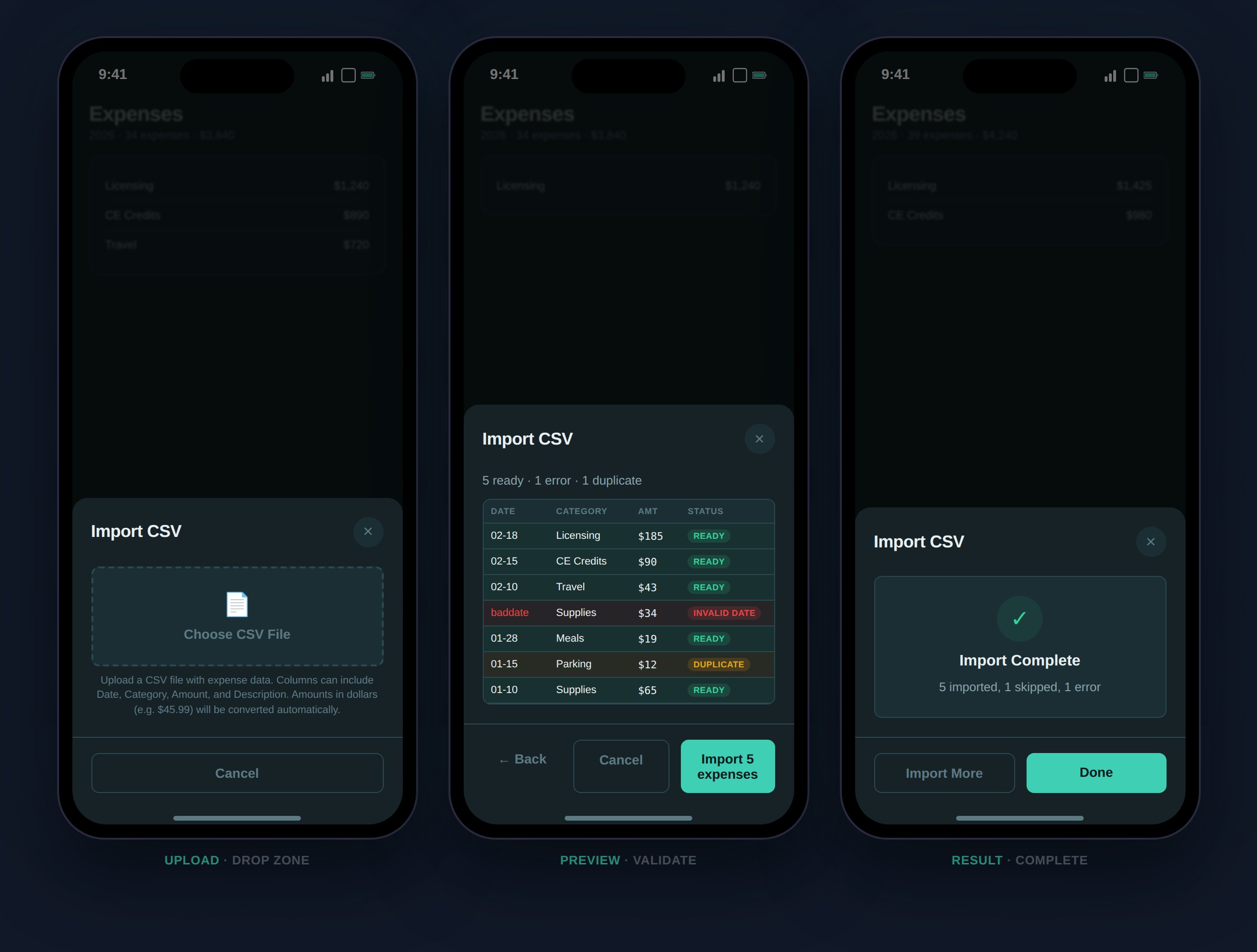 Bulk-import expenses from a CSV file:
1. Click **Import** on the Expenses page
2. Upload a `.csv` file
3. TaxHomeBase auto-detects columns by header row (date, category/type, amount/total/cost, description/note/vendor)
4. Preview shows color-coded rows: green (ready), red (error), amber (duplicate)
5. Confirm to import
Import limits: max 500 expenses per import, batch-inserted in 100-row chunks. The system deduplicates against existing expenses by (category, amount, date).
## Expense Reports
Bulk-import expenses from a CSV file:
1. Click **Import** on the Expenses page
2. Upload a `.csv` file
3. TaxHomeBase auto-detects columns by header row (date, category/type, amount/total/cost, description/note/vendor)
4. Preview shows color-coded rows: green (ready), red (error), amber (duplicate)
5. Confirm to import
Import limits: max 500 expenses per import, batch-inserted in 100-row chunks. The system deduplicates against existing expenses by (category, amount, date).
## Expense Reports
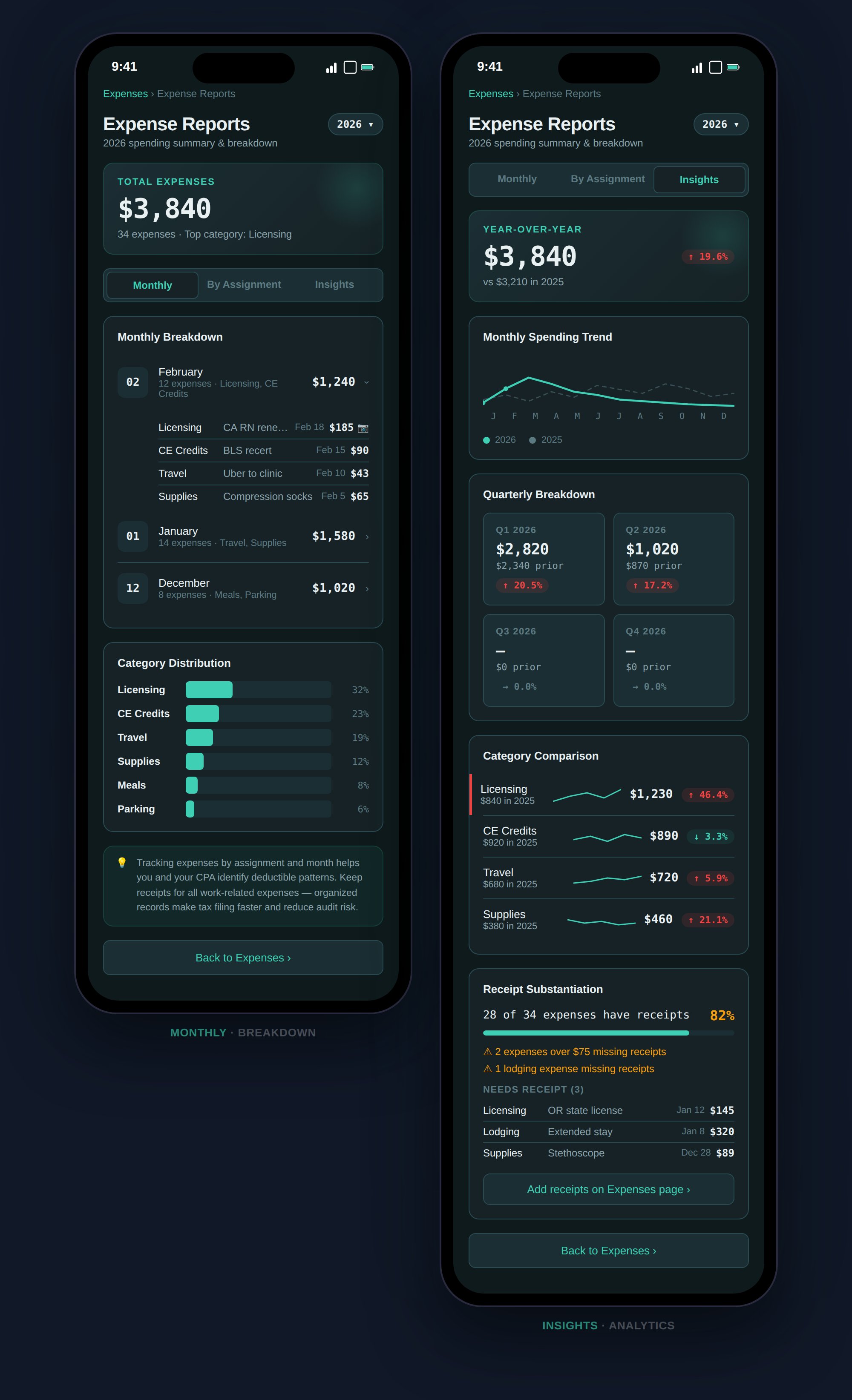 Navigate to **Expense Reports** (linked from the Expenses page) for three views:
Expenses grouped by month with expandable cards showing individual items, amounts, and receipt indicators.
Expenses grouped by linked assignment, with unlinked expenses in a separate group.
Year-over-year analysis:
* **YoY summary** — Total spend with change badge vs. previous year
* **Monthly trend** — SVG sparkline comparing current and previous year
* **Quarterly breakdown** — 2x2 grid (Q1–Q4) with change badges
* **Category comparison** — Per-category YoY with warning flags for 10%+ increases
* **Receipt substantiation** — Coverage percentage, IRS-flagged items (expenses >\$75 or lodging without receipts)
A summary banner at the top shows total amount, count, and top category with a category distribution bar chart.
## W-2 vs. 1099 Deductions
How expenses are handled depends on your employment type:
Under TCJA (2017–2025), unreimbursed employee expenses are **not deductible** on your federal return. However, 5 states still allow them: NY, CA, AL, HI, and AR.
TaxHomeBase still tracks your expenses because:
* State-level deductions may apply
* TCJA suspension of W-2 expense deductions is now permanent
* Expenses feed into profitability analysis
Business expenses reduce Schedule C income before self-employment tax. The 13 TaxHomeBase expense categories correspond to common deductible business expenses for 1099 travel nurses, subject to IRS substantiation requirements.
## Actions on Expense Cards
* **Expand** — View full details and receipt
* **Edit** — Modify any field
* **Delete** — Soft delete with 5-second undo toast
* **Duplicate** — Open a pre-filled create form
* **View Receipt** — Open receipt image in modal (camera icon)
Navigate to **Expense Reports** (linked from the Expenses page) for three views:
Expenses grouped by month with expandable cards showing individual items, amounts, and receipt indicators.
Expenses grouped by linked assignment, with unlinked expenses in a separate group.
Year-over-year analysis:
* **YoY summary** — Total spend with change badge vs. previous year
* **Monthly trend** — SVG sparkline comparing current and previous year
* **Quarterly breakdown** — 2x2 grid (Q1–Q4) with change badges
* **Category comparison** — Per-category YoY with warning flags for 10%+ increases
* **Receipt substantiation** — Coverage percentage, IRS-flagged items (expenses >\$75 or lodging without receipts)
A summary banner at the top shows total amount, count, and top category with a category distribution bar chart.
## W-2 vs. 1099 Deductions
How expenses are handled depends on your employment type:
Under TCJA (2017–2025), unreimbursed employee expenses are **not deductible** on your federal return. However, 5 states still allow them: NY, CA, AL, HI, and AR.
TaxHomeBase still tracks your expenses because:
* State-level deductions may apply
* TCJA suspension of W-2 expense deductions is now permanent
* Expenses feed into profitability analysis
Business expenses reduce Schedule C income before self-employment tax. The 13 TaxHomeBase expense categories correspond to common deductible business expenses for 1099 travel nurses, subject to IRS substantiation requirements.
## Actions on Expense Cards
* **Expand** — View full details and receipt
* **Edit** — Modify any field
* **Delete** — Soft delete with 5-second undo toast
* **Duplicate** — Open a pre-filled create form
* **View Receipt** — Open receipt image in modal (camera icon)