> ## Documentation Index
> Fetch the complete documentation index at: https://docs.taxhomebase.com/llms.txt
> Use this file to discover all available pages before exploring further.
# Dashboard
> Your command center for stipend protection, compliance alerts, and financial overview.
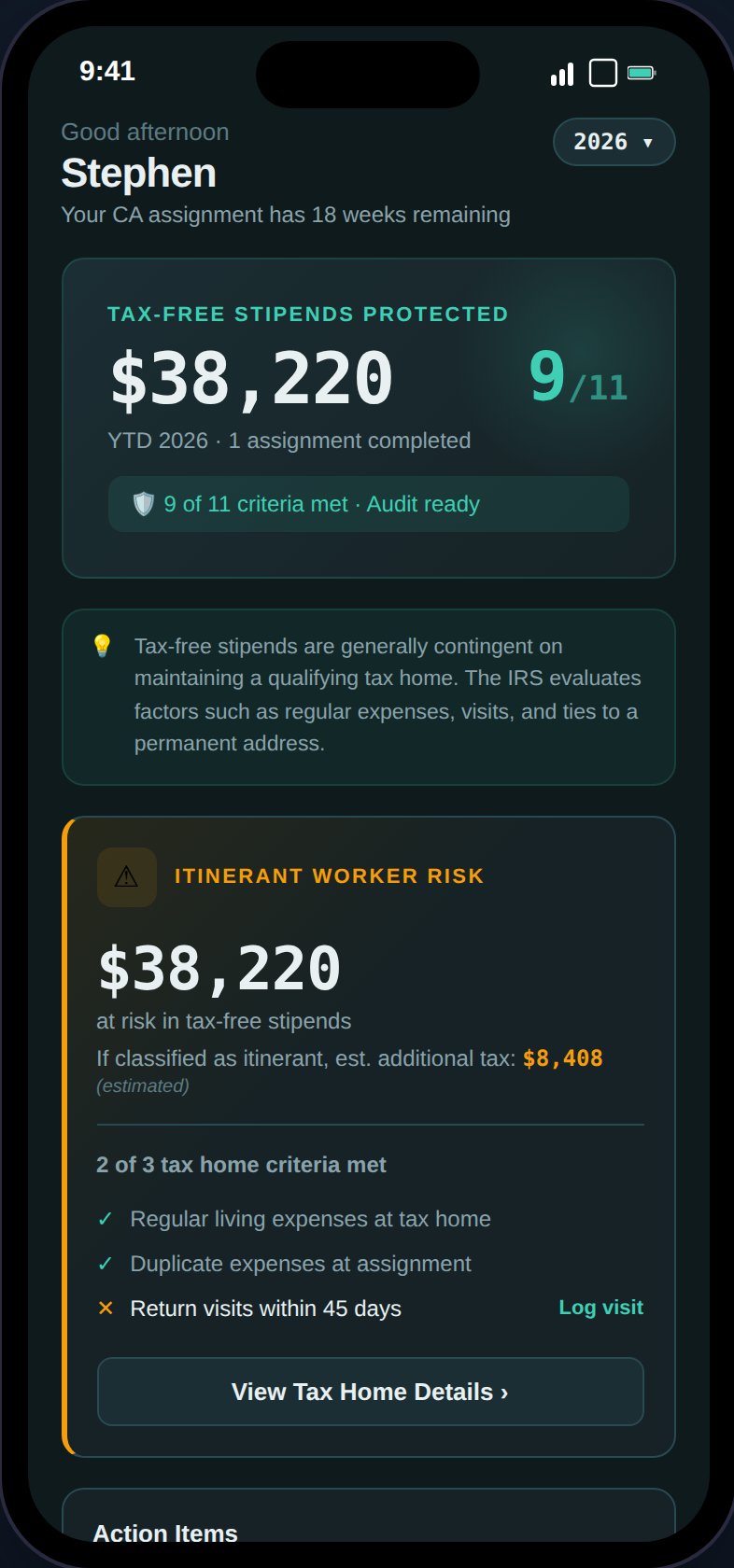
The Dashboard is your home screen, organized in a 3-tier visual hierarchy: hero banner at the top, actionable content in the middle, and reference data at the bottom.
 ## Stipend Protection Banner
The hero section shows your **year-to-date tax-free stipends** — the total housing and M\&IE stipend income across all assignments for the selected year. Below that is your **audit readiness score** (e.g., "8/11 criteria met"), which links to the [Tax Home](/guides/tax-home) page.
The footer displays either "Audit ready" (all criteria met) or "Action needed" (with a link to resolve issues).
## Action Items
Server-driven alerts that require your attention. These come from the [notification system](/guides/notifications) and include:
* **Stipend risk** — Tax home compliance issues that could jeopardize your stipends
* **Visit overdue** — More than 30 days since your last tax home visit
* **GSA exceeds** — Assignment stipends exceed IRS per diem limits
* **Credential expiring** — Professional licenses or certifications nearing expiry
* **Quarterly payment due** — Estimated tax payment deadline approaching
Each alert has a severity level (danger, warning, info) and links directly to the relevant section on the target page. Tapping an action item navigates to the page, scrolls to the section, and flashes it with an amber highlight. See [Where Alerts Link](/guides/notifications#where-alerts-link) for the full mapping.
When no alerts are active, contextual items appear instead — such as "View Tax Estimate" or "Review audit readiness."
## Tax Home Visit Tracker
A color-coded card showing days since your last tax home visit:
| Status | Days Since Visit | Color |
| ------------ | ---------------- | ----- |
| **On Track** | 0–30 days | Green |
| **Due Soon** | 31–45 days | Amber |
| **Overdue** | 45+ days | Red |
A progress bar fills as you approach the 45-day mark. The IRS doesn't mandate a specific visit frequency, but every 30 days is the recommended practice to demonstrate regular ties.
## YTD Financial Summary
A 2x2 grid showing:
* **Taxable Income** — Base pay + bonuses across all assignments
* **Tax-Free Stipends** — Housing + M\&IE stipends (the money you're protecting)
* **Expenses** — Total tracked deductible expenses
* **Est. Take-Home** — After-tax income (Pro users see the calculated amount; Free users see a dash with a "Pro" badge)
## Monthly Financial Breakdown (Desktop)
On desktop, the YTD Financial Summary expands into a month-by-month table with columns for taxable income, housing stipends, M\&IE stipends, expenses, mileage, and net income.
A **Forecast** toggle appears when there are projected future months (e.g., from active assignments that extend beyond today). Forecast is collapsed by default — tap the toggle to show projected rows, which appear with a dimmed style to distinguish them from actual data. Year-to-date totals are computed from assignment contract dates and logged expenses only; they do not include forecast projections.
## Tax Filing Preview
## Stipend Protection Banner
The hero section shows your **year-to-date tax-free stipends** — the total housing and M\&IE stipend income across all assignments for the selected year. Below that is your **audit readiness score** (e.g., "8/11 criteria met"), which links to the [Tax Home](/guides/tax-home) page.
The footer displays either "Audit ready" (all criteria met) or "Action needed" (with a link to resolve issues).
## Action Items
Server-driven alerts that require your attention. These come from the [notification system](/guides/notifications) and include:
* **Stipend risk** — Tax home compliance issues that could jeopardize your stipends
* **Visit overdue** — More than 30 days since your last tax home visit
* **GSA exceeds** — Assignment stipends exceed IRS per diem limits
* **Credential expiring** — Professional licenses or certifications nearing expiry
* **Quarterly payment due** — Estimated tax payment deadline approaching
Each alert has a severity level (danger, warning, info) and links directly to the relevant section on the target page. Tapping an action item navigates to the page, scrolls to the section, and flashes it with an amber highlight. See [Where Alerts Link](/guides/notifications#where-alerts-link) for the full mapping.
When no alerts are active, contextual items appear instead — such as "View Tax Estimate" or "Review audit readiness."
## Tax Home Visit Tracker
A color-coded card showing days since your last tax home visit:
| Status | Days Since Visit | Color |
| ------------ | ---------------- | ----- |
| **On Track** | 0–30 days | Green |
| **Due Soon** | 31–45 days | Amber |
| **Overdue** | 45+ days | Red |
A progress bar fills as you approach the 45-day mark. The IRS doesn't mandate a specific visit frequency, but every 30 days is the recommended practice to demonstrate regular ties.
## YTD Financial Summary
A 2x2 grid showing:
* **Taxable Income** — Base pay + bonuses across all assignments
* **Tax-Free Stipends** — Housing + M\&IE stipends (the money you're protecting)
* **Expenses** — Total tracked deductible expenses
* **Est. Take-Home** — After-tax income (Pro users see the calculated amount; Free users see a dash with a "Pro" badge)
## Monthly Financial Breakdown (Desktop)
On desktop, the YTD Financial Summary expands into a month-by-month table with columns for taxable income, housing stipends, M\&IE stipends, expenses, mileage, and net income.
A **Forecast** toggle appears when there are projected future months (e.g., from active assignments that extend beyond today). Forecast is collapsed by default — tap the toggle to show projected rows, which appear with a dimmed style to distinguish them from actual data. Year-to-date totals are computed from assignment contract dates and logged expenses only; they do not include forecast projections.
## Tax Filing Preview
 Shows what to expect at tax time:
* **Documents expected** — Count and type (W-2 or 1099-NEC) per unique agency
* **Returns to file** — Federal return plus non-resident state returns, with state chips
* **Estimated total tax** — Annual and quarterly amounts (Pro only)
* **Filing deadline** — April 15 of the following year
## Onboarding Checklist
First-run guide that appears for new users with 4 tasks:
1. Set up your tax home
2. Add an assignment
3. Log an expense
4. Check your audit readiness
The checklist is dismissable. You can restore it from the [Profile](/guides/dashboard) page via "Restore dismissed tips."
## Contextual Greeting
The subtitle below your name changes based on your status:
* Active assignment: "Currently at {facility}"
* No active assignment: "{X} assignments completed this year"
Shows what to expect at tax time:
* **Documents expected** — Count and type (W-2 or 1099-NEC) per unique agency
* **Returns to file** — Federal return plus non-resident state returns, with state chips
* **Estimated total tax** — Annual and quarterly amounts (Pro only)
* **Filing deadline** — April 15 of the following year
## Onboarding Checklist
First-run guide that appears for new users with 4 tasks:
1. Set up your tax home
2. Add an assignment
3. Log an expense
4. Check your audit readiness
The checklist is dismissable. You can restore it from the [Profile](/guides/dashboard) page via "Restore dismissed tips."
## Contextual Greeting
The subtitle below your name changes based on your status:
* Active assignment: "Currently at {facility}"
* No active assignment: "{X} assignments completed this year"