> ## Documentation Index
> Fetch the complete documentation index at: https://docs.taxhomebase.com/llms.txt
> Use this file to discover all available pages before exploring further.
# Assignments
> Track your travel nursing contracts with timeline views, GSA comparison, profitability analysis, and more.
The Assignments page is your contract management hub. Every assignment you add feeds into tax calculations, state income tracking, GSA compliance checks, and profitability analysis.
 ## Adding an Assignment
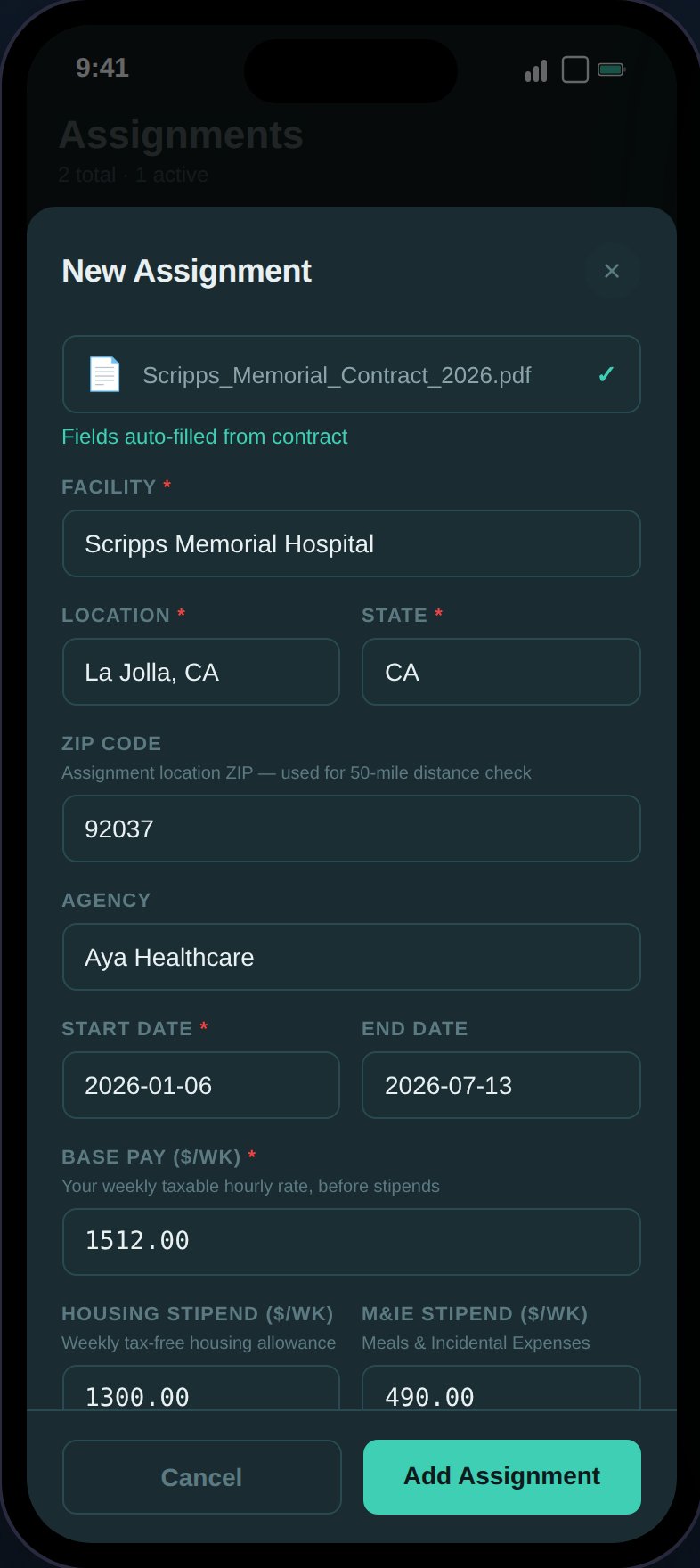
Tap the **+** button to open the assignment form. Required fields:
| Field | Description |
| -------------- | ----------------------------------------------------- |
| **Facility** | Hospital or facility name |
| **Location** | City name |
| **State** | 2-letter state code (all 50 states + DC) |
| **Start Date** | Contract start date |
| **Base Pay** | Weekly pre-tax base pay (in dollars, stored as cents) |
Optional fields: agency, end date, housing stipend, M\&IE stipend, status, sign-on/completion/referral bonuses, contract file.
Use **Scan Contract** to auto-extract all 12 fields from a PDF or image. See [Contract Scanning](/guides/contract-scanning) for details.
## Adding an Assignment
Tap the **+** button to open the assignment form. Required fields:
| Field | Description |
| -------------- | ----------------------------------------------------- |
| **Facility** | Hospital or facility name |
| **Location** | City name |
| **State** | 2-letter state code (all 50 states + DC) |
| **Start Date** | Contract start date |
| **Base Pay** | Weekly pre-tax base pay (in dollars, stored as cents) |
Optional fields: agency, end date, housing stipend, M\&IE stipend, status, sign-on/completion/referral bonuses, contract file.
Use **Scan Contract** to auto-extract all 12 fields from a PDF or image. See [Contract Scanning](/guides/contract-scanning) for details.
 ## Assignment Statuses
Assignments follow a lifecycle: `upcoming` → `active` → `complete`. Status transitions are enforced — you can't move a completed assignment back to active.
## Timeline View
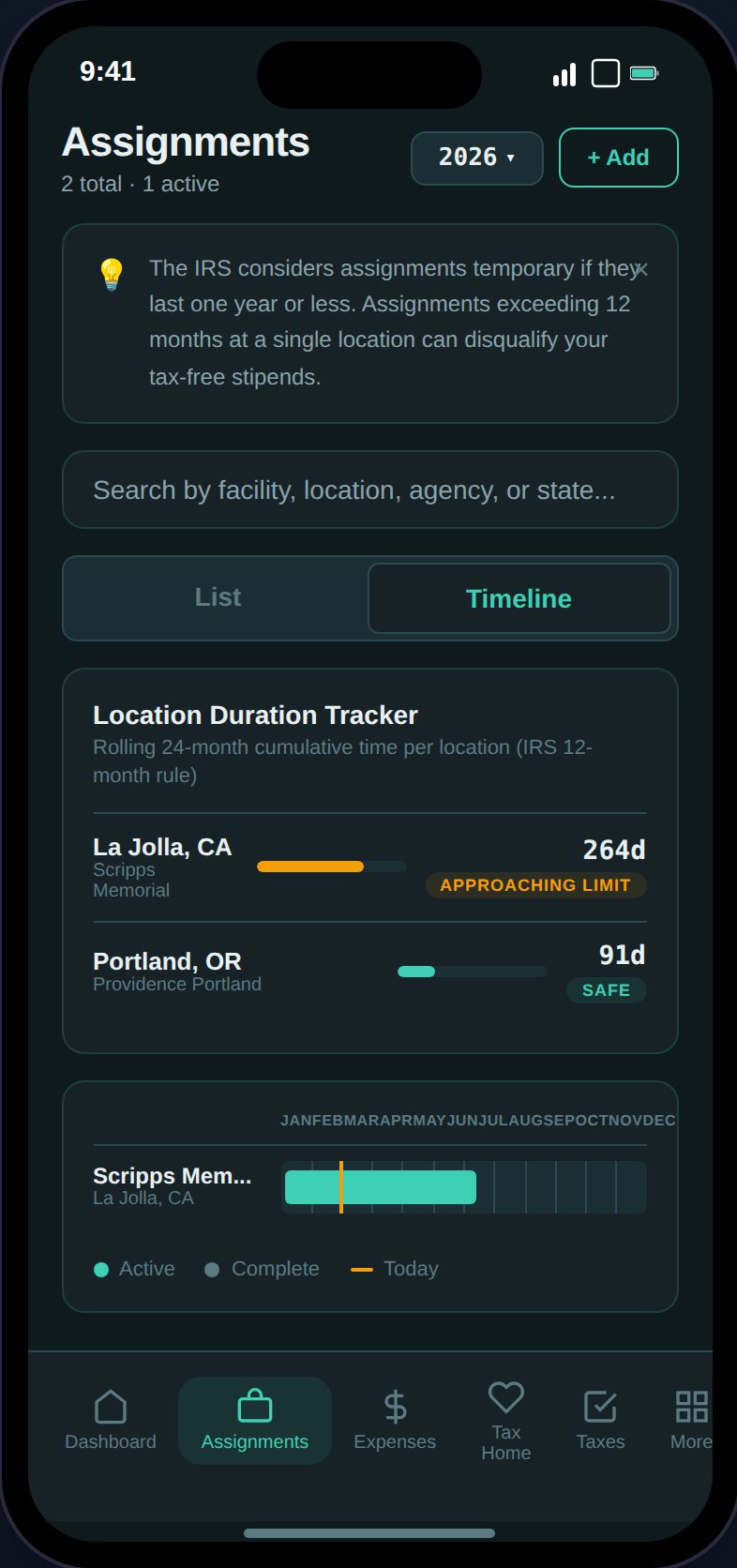
Toggle between **List** and **Timeline** views. The timeline shows a Gantt-style horizontal chart:
* Bars positioned by percentage within the selected year
* **Teal bars** for active assignments, **gray** for complete
* Month grid lines across the top
* **Amber "today" marker** (vertical line) for the current year
## 12-Month Rule Badges
Assignment cards display risk badges based on duration:
| Badge | Condition | Meaning |
| ---------------------------------- | --------- | ---------------------------------------------------- |
| Amber "Approaching 12-month limit" | >45 weeks | Getting close to the IRS limit |
| Red "Exceeds 12-month limit" | >52 weeks | The IRS may consider this location your new tax home |
See [The 12-Month Rule](/tax-education/twelve-month-rule) for the full explanation.
## Expanded Assignment Detail
Tap any assignment card to expand and see:
Base pay, housing stipend, M\&IE stipend, and any bonuses with weekly and contract-total amounts.
Evaluates 7 criteria against your actual tax home status to determine if your stipends are defensible in an audit:
1. Tax home established
2. Rent being paid
3. Recent visit (within 30 days)
4. Documentation ties (voter registration / driver's license)
5. Property not rented out
6. 12-month rule compliance
7. GSA compliance
**Verdict**: Defensible (6-7/7), At Risk (5/7), or Not Defensible (4 or fewer). When not defensible, shows the total stipends at risk and estimated 22% tax impact.
Compares your agency housing stipend against HUD Fair Market Rent (FMR) for the assignment location:
* "Your Housing / wk" vs. "Local Rent / wk"
* Green "+$X/wk surplus" or amber "-$X/wk shortfall"
Compares your daily stipend rates against IRS/GSA limits:
* Your rate vs. IRS max for housing and M\&IE (daily)
* Green "Within GSA limits" or amber "Exceeds GSA limits" badge
* First/last day 75% M\&IE note
See [GSA Per Diem](/guides/gsa-per-diem) for more detail.
Compares taking the cash stipend vs. accepting agency housing:
* **Scenario A (Take Stipend)**: tax-free stipend income minus out-of-pocket rent (FMR estimate)
* **Scenario B (Agency Housing)**: no housing stipend, no rent cost
* Shows weekly difference and contract-total savings
* Hidden when housing stipend is \$0
Net profit breakdown (lazy-loaded on first expand):
* **Gross Comp** — Total compensation including stipends
* **Est. Taxes** — Federal, state, and SE tax (proportionally allocated)
* **Linked Expenses** — Expenses and mileage tied to this assignment
* **Net Profit** — Green if positive, red if negative, with margin percentage
* "Above/below average" note when you have multiple assignments
## Location Duration Tracker
Between the tab toggle and assignment list, a tracker shows **rolling 24-month cumulative days** per location (city + state) across all assignments:
| Color | Days | Badge |
| ----- | ------- | ----------------- |
| Green | \< 270 | Safe |
| Amber | 270–365 | Approaching limit |
| Red | > 365 | Exceeds limit |
This is the IRS 12-month rule check at the location level, not per-assignment. See [The 12-Month Rule](/tax-education/twelve-month-rule).
## Permanent Conversion Warning
Assignments 26+ weeks show an amber warning about the IRS risk of converting from travel to permanent — prior stipends may retroactively become taxable.
## Contract File
If you uploaded a contract during creation (or via scan), a "View Contract" button appears that opens the file in a new tab via presigned S3 URL.
## Assignment Statuses
Assignments follow a lifecycle: `upcoming` → `active` → `complete`. Status transitions are enforced — you can't move a completed assignment back to active.
## Timeline View
Toggle between **List** and **Timeline** views. The timeline shows a Gantt-style horizontal chart:
* Bars positioned by percentage within the selected year
* **Teal bars** for active assignments, **gray** for complete
* Month grid lines across the top
* **Amber "today" marker** (vertical line) for the current year
## 12-Month Rule Badges
Assignment cards display risk badges based on duration:
| Badge | Condition | Meaning |
| ---------------------------------- | --------- | ---------------------------------------------------- |
| Amber "Approaching 12-month limit" | >45 weeks | Getting close to the IRS limit |
| Red "Exceeds 12-month limit" | >52 weeks | The IRS may consider this location your new tax home |
See [The 12-Month Rule](/tax-education/twelve-month-rule) for the full explanation.
## Expanded Assignment Detail
Tap any assignment card to expand and see:
Base pay, housing stipend, M\&IE stipend, and any bonuses with weekly and contract-total amounts.
Evaluates 7 criteria against your actual tax home status to determine if your stipends are defensible in an audit:
1. Tax home established
2. Rent being paid
3. Recent visit (within 30 days)
4. Documentation ties (voter registration / driver's license)
5. Property not rented out
6. 12-month rule compliance
7. GSA compliance
**Verdict**: Defensible (6-7/7), At Risk (5/7), or Not Defensible (4 or fewer). When not defensible, shows the total stipends at risk and estimated 22% tax impact.
Compares your agency housing stipend against HUD Fair Market Rent (FMR) for the assignment location:
* "Your Housing / wk" vs. "Local Rent / wk"
* Green "+$X/wk surplus" or amber "-$X/wk shortfall"
Compares your daily stipend rates against IRS/GSA limits:
* Your rate vs. IRS max for housing and M\&IE (daily)
* Green "Within GSA limits" or amber "Exceeds GSA limits" badge
* First/last day 75% M\&IE note
See [GSA Per Diem](/guides/gsa-per-diem) for more detail.
Compares taking the cash stipend vs. accepting agency housing:
* **Scenario A (Take Stipend)**: tax-free stipend income minus out-of-pocket rent (FMR estimate)
* **Scenario B (Agency Housing)**: no housing stipend, no rent cost
* Shows weekly difference and contract-total savings
* Hidden when housing stipend is \$0
Net profit breakdown (lazy-loaded on first expand):
* **Gross Comp** — Total compensation including stipends
* **Est. Taxes** — Federal, state, and SE tax (proportionally allocated)
* **Linked Expenses** — Expenses and mileage tied to this assignment
* **Net Profit** — Green if positive, red if negative, with margin percentage
* "Above/below average" note when you have multiple assignments
## Location Duration Tracker
Between the tab toggle and assignment list, a tracker shows **rolling 24-month cumulative days** per location (city + state) across all assignments:
| Color | Days | Badge |
| ----- | ------- | ----------------- |
| Green | \< 270 | Safe |
| Amber | 270–365 | Approaching limit |
| Red | > 365 | Exceeds limit |
This is the IRS 12-month rule check at the location level, not per-assignment. See [The 12-Month Rule](/tax-education/twelve-month-rule).
## Permanent Conversion Warning
Assignments 26+ weeks show an amber warning about the IRS risk of converting from travel to permanent — prior stipends may retroactively become taxable.
## Contract File
If you uploaded a contract during creation (or via scan), a "View Contract" button appears that opens the file in a new tab via presigned S3 URL.